GPU (In)efficiency in AI Workloads
tl;dr: GPUs often have low utilization, which at scale slows model iteration and increases the cost of compute. This post focuses on how computing architectures designed for CPU-centric, stateless workloads impact GPU efficiency and what AI-native execution requires.
Modern AI is built and run on GPUs, but in production these accelerators are often underutilized. Across data processing, model training, and inference, production AI workloads often achieve well below 50% sustained utilization, even under load.
The issue is more than just about the cost of compute. Underutilized GPUs directly limit throughput, slow model iteration, and constrain the rate of training, evaluating, and deploying new models.
The source of this inefficiency is not primarily because of hardware or model design. Instead it comes from the architecture of the computing systems used to orchestrate these workloads across many machines.
Over the past decade, the default computing architecture has been designed on assumptions inherent in web applications and structured data workloads: CPU-only execution, stateless processes, and coarse-grained containerized deployment.
These assumptions do not hold for the compute patterns of AI workloads. In this post, we dive into the causes of GPU underutilization and show how addressing the problem requires a different execution model.
LinkHeterogeneous compute patterns in AI workloads
Modern distributed systems have largely been shaped by web services. In these systems, workloads are uniform, stateless, and CPU-bound. A service instance handles requests end-to-end, scaling horizontally by replicating identical containers. Resource requirements are relatively stable over time, and performance scales predictably with the number of replicas.
AI workloads do not follow this model.
Instead of single, uniform execution, AI workloads are composed of multiple stages with fundamentally different resource requirements, execution characteristics, and scaling behavior. These stages frequently alternate between CPU-bound and GPU-bound computation—often multiple times within a single workload—creating resource demands that vary significantly over the lifetime of a request or job.
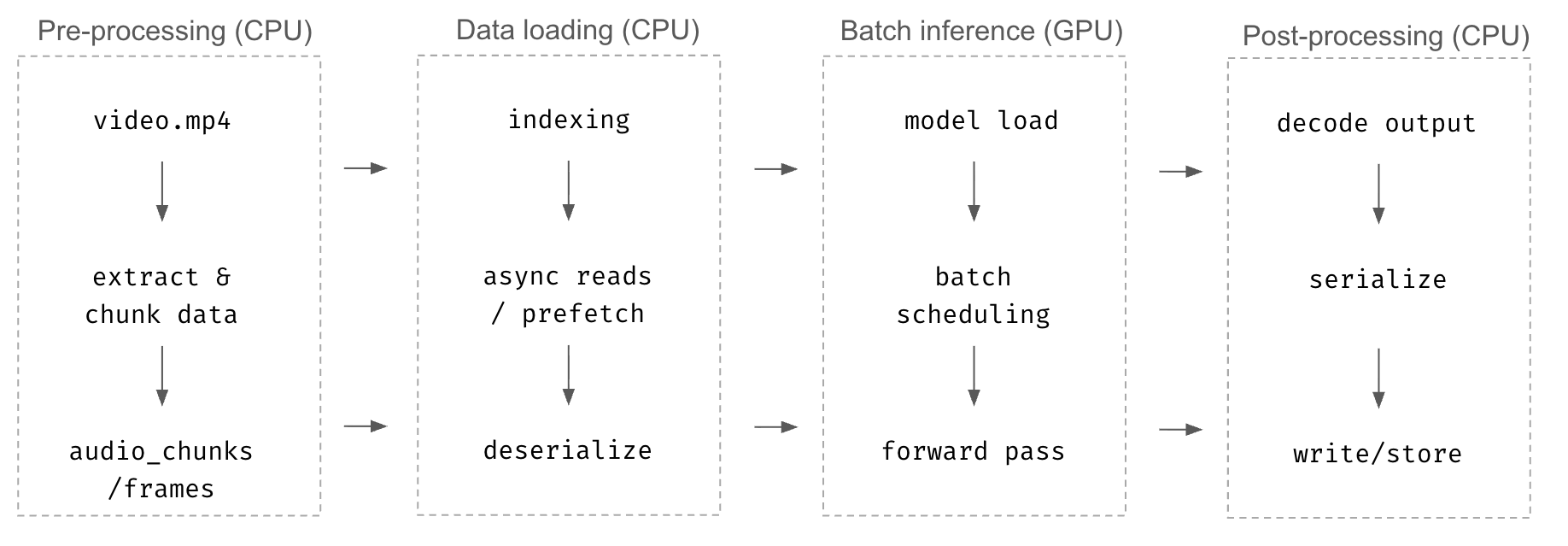
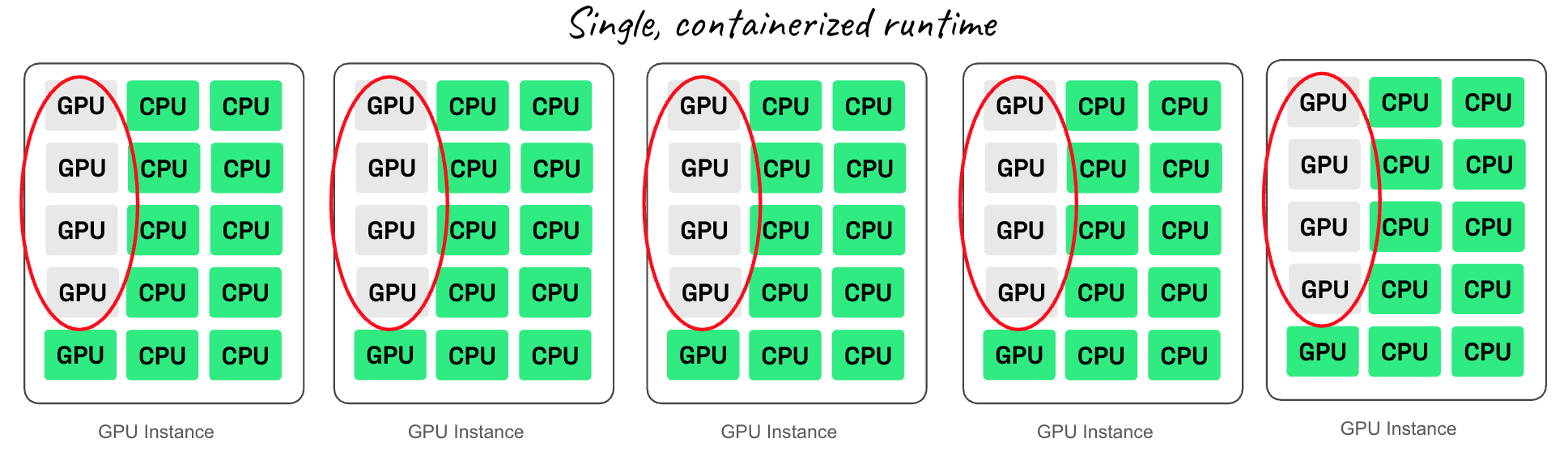
Despite this heterogeneity, these workloads are frequently packaged into a single containerized runtime that scales out by sharding the data. You have CPU-heavy preprocessing, GPU-heavy inference or training, and CPU-heavy postprocessing all wrapped into the same container. The GPU must then be allocated for the entire lifecycle, even if it’s only needed for a portion of the computation. So you end up with a mismatch between the shape of the workload and the shape of the infrastructure.
This inefficiency shows up all across AI workloads.
In data processing, images, video, and text move through CPU-heavy decode stages, then through GPU inference, then back to CPU for formatting and storage. In training, GPU nodes are forced to host Python dataloaders that can’t keep pace, starving the accelerator. In LLM inference, high-throughput prefill competes with slow, autoregressive decode in a single replica, leading to suboptimal batching where compute-bound and memory-bound phases stall each other, causing long stretches of idle cycles.
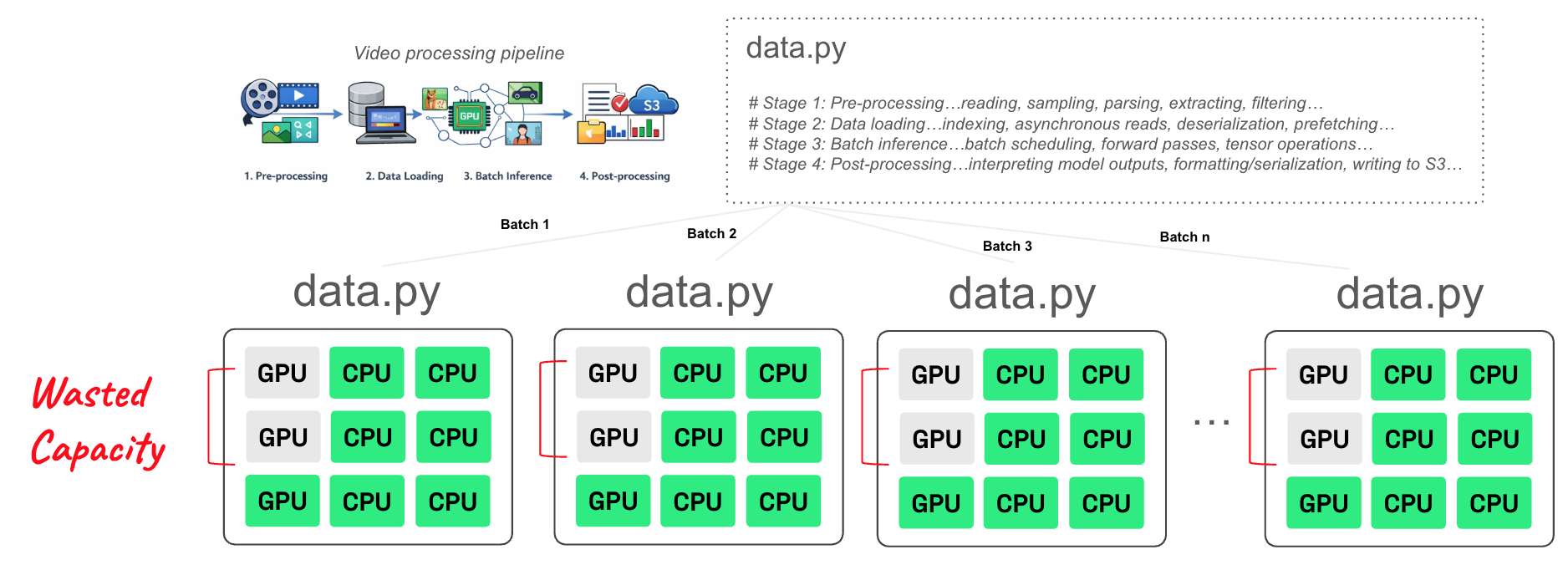
Here’s the root of the problem: when CPU-heavy and GPU-heavy stages are packaged together and deployed as a single workload, the entire workload is forced to scale as one unit. This means expensive GPUs remain allocated even when only the CPU stages are running, guaranteeing low utilization and high cost.
For example, imagine a container that performs CPU preprocessing followed by GPU inference. You deploy it on a node with 8 GPUs and 64 CPUs. The CPU stage then saturates all 64 CPUs, but the GPU stage uses only 20% of the GPUs. If you need 5X more throughput, you must replicate the entire GPU instance four more times—even though the GPUs were never the bottleneck. The result: 5 GPU nodes, each using only 20% GPU capacity.
As models scale, there is an uncomfortable but undeniable truth: GPUs are being wasted.
LinkAI-native computing with disaggregated execution
Ray is an open source compute framework designed to support the heterogeneous resource requirements for AI workloads via simple Pythonic APIs that scales workloads efficiently.
Instead of binding an entire workload to monolithic containers, Ray under the hood decomposes workloads into independent stages, each explicitly declaring its precise, fractional resource needs. CPU processing only runs on CPUs. GPU processing runs only on GPUs. Computing tasks can run on fractional GPUs (with dynamic partitioning and scheduling for 100s of 1000s of processing tasks). Data streams continuously between stages via its in-memory object store, providing fast, distributed object passing.
In data processing, Ray disaggregates heterogeneous workloads separating CPU-bound stages such as decoding and parsing unstructured data (e.g., text, images, or video) from GPU-accelerated embedding and model inference stages. By orchestrating these stages as independent components in a DAG (abstracted via Ray Data), Ray allows CPU-heavy data prep to scale independently from GPU execution.
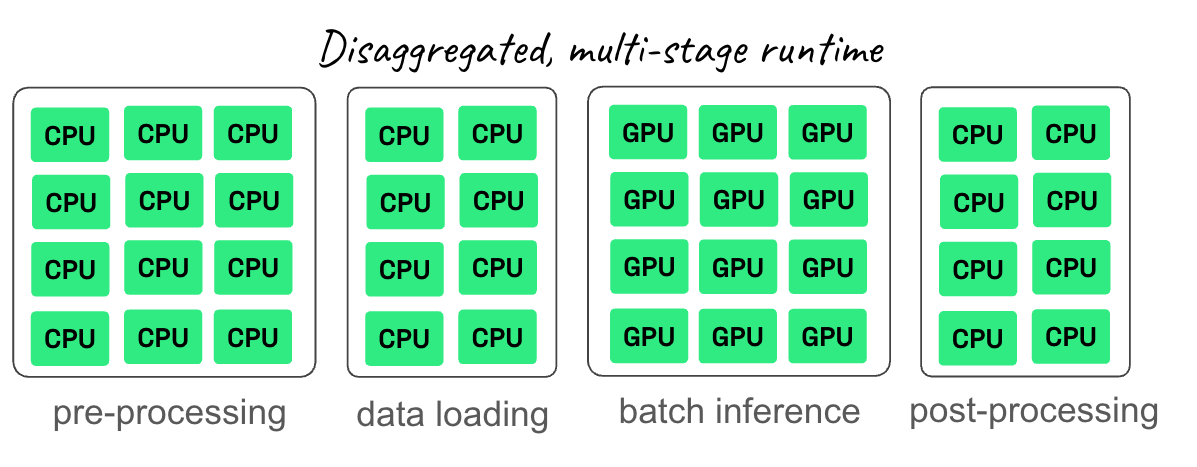
In training, Ray separates dataloading from GPU training entirely. Rather than forcing the data loader to compete with the trainer on a GPU, Ray uses a scalable CPU pool that feeds GPUs with a constant stream of ready-to-use batches. The GPU is no longer constrained by the CPU:GPU ratio of a single instance.
In inference—especially LLM serving—Ray enables disaggregated serving at scale with vLLM, decoupling the compute-bound pre-fill phase from the memory-bound decode phase. By orchestrating these as independent stages in a DAG, Ray allows for granular scaling and resource isolation, significantly optimizing hardware utilization and cost.
This is why AI-native execution is so important to close the gap between the way AI workloads behave and how compute gets orchestrated.
LinkPractical example
Let’s take an example: consider an AI workload that requires 64 CPUs for every 1 GPU – and imagine you need to scale to 2048 CPUs and 32 GPUs. And let’s say there are two kinds of instances:
Instance 1: GPU instance: 64 CPUs + 8 GPUs
Instance 2: CPU instance: 64 CPUs
Single, Containerized Runtime: In this architecture, you have to use the GPU instance type to get access to GPUs. Because the workload is CPU-hungry, the CPU fills up before the GPUs do. To get the necessary CPU power (2048 CPUs), you have to provision 32 GPU instances.
Total Resources: 32 GPU instances × 8 GPUs per instance = 256 GPUs
Used Resources: You only use 32 GPUs
Waste Resources: You are at 12.5% GPU utilization, paying for 224 GPUs that sit idle just to get enough CPUs.
Disaggregated, Multi-Stage Runtime: Now with Ray, CPU and GPU stages are separated to provide precise resource allocation to each stage, so all the GPUs allocated are fully saturated.
GPU Stage: Requires 32 GPUs -> 4 GPU instances (providing 32 GPUs and 256 CPUs)
CPU Stage: Requires remaining 1792 CPUs -> 28 CPU instances.
Wasted Resources: You are at 100% utilization, all resources fully saturated.
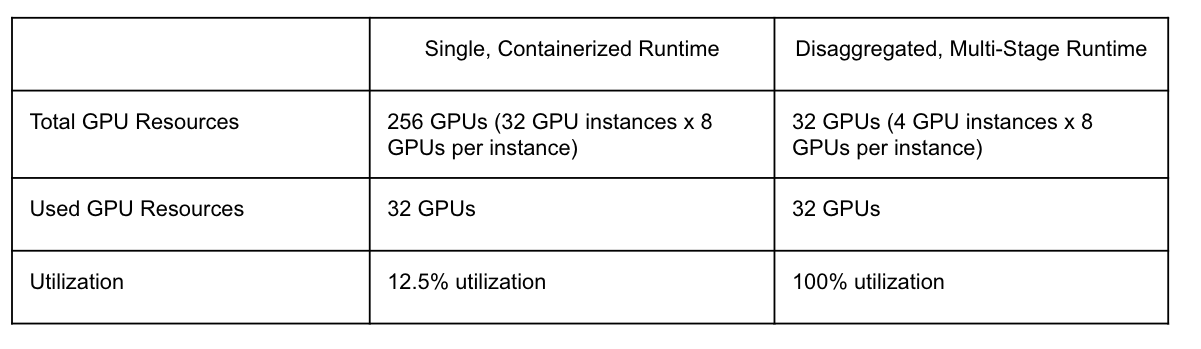
Same total CPU throughput, but with Ray the required GPU instances reduce from 32 to just 4 effective for compute. This is an 8X reduction in GPU requirements for the same workload. And this efficiency applies to the entire AI pipeline from data processing, model training, to inference.
LinkCluster-level scheduling for AI workloads
While Ray improves utilization for individual workloads, cluster-level scheduling still remains a problem.
AI workloads are bursty and uneven. Data processing may spike CPU demand, training jobs may require hundreds or thousands of GPUs for limited periods, and inference workloads can surge within minutes. Static cluster boundaries and fixed resource pools respond poorly to this variability, often leading to overprovisioning.
Anyscale solves this by turning computing resources into a shared, compute fabric rather than a collection of isolated CPU and GPU clusters. Instead of every team maintaining its own pool of accelerators — where each sized for peak load and idle most of the time — compute can be aggregated into a global pool that all Ray workloads draw from. When a workload needs resources, it gets them; when it finishes, the resources immediately flow back into the shared pool for a different workload to use.
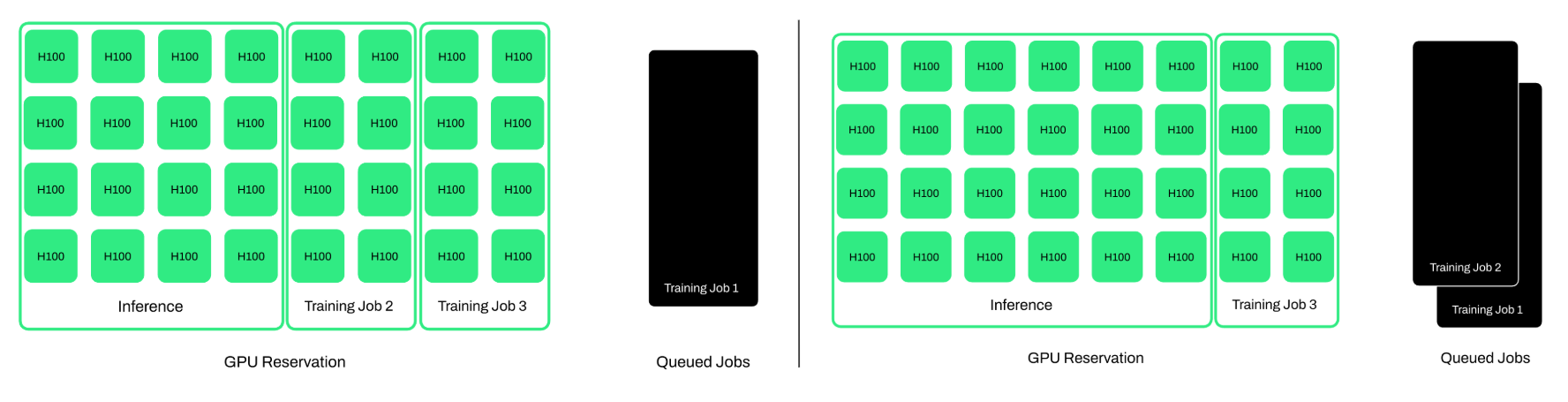
This approach enables higher average utilization across uneven and time-varying AI workloads, allowing GPUs to be reassigned to active computation rather than remaining idle. Anyscale reshapes clusters to match these changing demands, ensuring GPUs are always running the highest-priority work rather than sitting idle inside underutilized clusters.
For additional compute savings, long-running training jobs and batch inference workloads can make use of highly reliable spot capacity. The effect: organizations gain access to far more compute, at far lower cost, with far higher utilization — running all AI workloads efficiently.
Together, Ray and Anyscale form an efficient AI-native computing foundation: Ray makes each workload efficient, and Anyscale ensures that efficiency carries through all AI workloads and AI platform. The result is maximum packing efficiency of CPU and GPU resources across teams, no idle accelerators, and a dramatic reduction in the total amount of hardware required to support the business.
LinkObserved GPU efficiency
Organizations running large-scale AI workloads have observed 50-70% improvements in GPU utilization using Anyscale and Ray together, more than halving compute costs and model development timelines.
For example, Canva, has build an AI platform with more than 100 machine learning models in production. By building its platform with Anyscale, Canva has seen nearly 100% GPU utilization during distributed model training, reduced cloud costs by roughly 50%, and accelerated model evaluation performance by up to 12X compared to their previous infrastructure. These gains allowed them to scale GPUs and fully saturate hardware where it had previously been underutilized.
Similarly, Attentive, a personalized marketing platform processing trillions of data points for hundreds of millions of users, saw significant improvements after adopting Anyscale. Attentive saw a 99% reduction in infrastructure cost and a 5X decrease in training time, even while processing 12X more data than before.
These results illustrate how aligning execution and scheduling models with AI workload structure translates into higher utilization and improved system efficiency.
LinkGPU efficiency accelerates model iteration
The most important impact of improving GPU utilization is how it accelerates model iteration.
When GPUs no longer sit idle waiting on CPU-bound preprocessing or dataloaders, training cycles shrink. LLM inference, post-training, fine-tuning, and data processing become dramatically faster and cheaper. Teams can explore more ideas in parallel, test more variants, and move from concept to production far more quickly.
In a world where AI advantage is defined by iteration speed, GPU utilization is not just a cost lever — it is an advantage accelerant.
Anyscale is solving compute inefficiency in AI, with a compute platform that enables organizations to scale AI workloads efficiently across teams, workloads, and clusters. To try it out, Anyscale can be accessed for free here.