Optimizing VLA Fine-Tuning Performance with LeRobot Datasets and Ray
VLA fine-tuning is difficult to scale because the LeRobot dataset format poses an inherent tradeoff between parallelism and redundant IO. This blog post describes a method for navigating that tradeoff and optimizing VLA fine-tuning performance.
LinkIntroduction
In this post we walk through a complete, working example of distributed VLA fine-tuning with a LeRobot Dataset using Ray. We fine-tune pi0.5 on the xvla-soft-fold cloth-folding dataset (LeRobot v3.0 format).
Two scaling challenges motivate the design:
LeRobot Dataset v3.0 is an emerging standard for robot manipulation data, but scaling reads from it can be challenging. Specifically, the format splits each episode across multiple video files (one per camera and additional tabular files for metadata) while simultaneously concatenating many episodes for each camera into the same video file (for space efficiency). As a consequence, naive parallel processing of the episodes in a dataset will require opening each MP4 many times (~45 times on average in the xvla-soft-fold dataset). We propose a file-group partitioning strategy that balances parallelism with redundant video opens. This approach reduces the number of file opens by 15-135x in our experiments.
VLA fine-tuning is fundamentally about larger models and larger datasets, which creates a CPU/GPU hardware mismatch. Multi-camera video decoding and preprocessing is CPU- and I/O-bound; training a VLA transformer is GPU-bound. Co-locating them stalls GPUs on I/O. Preprocessing offline adds hours of latency and storage before training can start. The ideal solution decouples the two.
Ray solves those challenges. Ray Data runs streaming, decoding, and preprocessing on auto-scaled CPU workers and feeds GPU workers through a backpressure-aware pipeline. Ray Train manages distributed PyTorch across GPUs, including DDP setup, checkpointing, and fault recovery. The two stages are pipelined together and scale CPU and GPU capacity independently. Add CPU nodes when decoding is the bottleneck. Add GPUs when training is.
LinkThe Pipeline
Before diving into the details, below is a diagram representing the pipeline.
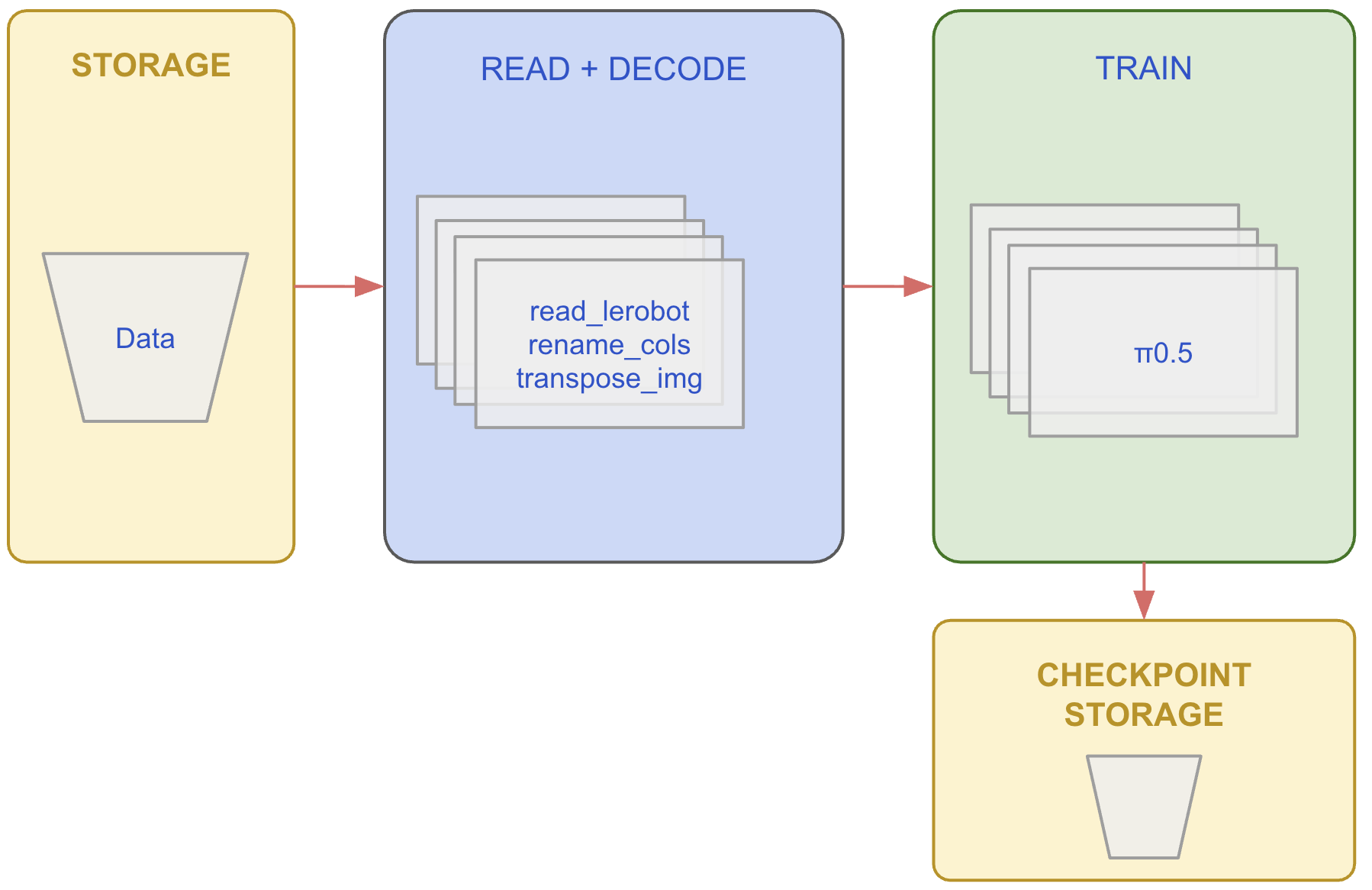
Also, below is the top-level code for the complete solution. Broadly, the code
reads a lerobot dataset
specifies the streaming data pipeline (on CPUs)
launches distributed training (on GPUs)
Here is the top-level code.
import ray
from lerobot_datasource import LeRobotDatasource

# ──────────────────────────────────────────────
# Stage 1: Build the streaming data pipeline (CPU)
# ──────────────────────────────────────────────
DATASET_PATH = "s3://anyscale-public-robotics-datasets/lerobot/lerobot/xvla-soft-fold"

CAMERA_RENAME = {
    "observation.images.cam_high":        "observation.images.base_0_rgb",
    "observation.images.cam_left_wrist":  "observation.images.left_wrist_0_rgb",
    "observation.images.cam_right_wrist": "observation.images.right_wrist_0_rgb",
}

source = LeRobotDatasource(DATASET_PATH)
stats = util.extract_stats(source)
image_keys = util.renamed_image_keys(source, CAMERA_RENAME)

ds = (
    ray.data
    .read_datasource(source)
    .map(rename_columns, fn_args=(CAMERA_RENAME,))                        # Rename cameras
    .map_batches(transpose_images, batch_size=32, fn_args=(image_keys,))  # HWC → CHW float32
)

# ──────────────────────────────────────────────
# Stage 2: Launch distributed training (GPU)
# ──────────────────────────────────────────────

trainer = ray.train.torch.TorchTrainer(
    train_loop_per_worker=train_loop_per_worker,
    train_loop_config={
        "stats": stats,
        "total_rows": source.meta.total_frames,
        "num_epochs": 2,
        "batch_size": 4,
        "grad_accum": 2,
        "lr": 1e-4,
        "warmup_frac": 0.1,
        "max_len": 512,
    },
    scaling_config=ray.train.ScalingConfig(num_workers=4, use_gpu=True),
    run_config=ray.train.RunConfig(
        name="pi05-xvla-soft-fold-finetune",
        storage_path="/mnt/cluster_storage/ray_train_runs/pi05_xvla_soft_fold",
        failure_config=ray.train.FailureConfig(max_failures=1),
    ),
    datasets={"train": ds},
)

result = trainer.fit()
In the next sections we discuss each of the pipelines’ components
LinkPart 1: Reading from the LeRobot v3.0 Data Format
LeRobot Dataset v3.0 stores data in three separate pieces: chunked Parquet files for per-frame tabular data (actions, states, timestamps); chunked MP4 files for camera observations (one set of video files per camera); and episode metadata that ties them together by recording which parquet chunk and which video file each episode belongs to.
To produce a single training row, a data loader must join these pieces: read a Parquet row for the tabular data, then seek-and-decode the corresponding frame from each camera's MP4 file at the right timestamp, and stitch them together with the episode's task description. For xvla-soft-fold that means joining 3 video streams (cam_high, cam_left_wrist, cam_right_wrist) with tabular data for every frame.
With that pipeline in mind we can begin to look at the system aspect, i.e. optimizing throughput by partitioning the data for parallel I/O. We frame the question as: how do you split the data into separate chunks such that each worker can read and process independently without conflicts?
In the LeRobot Dataset v3 format, multiple episodes are packed into the same MP4 video file while simultaneously being split across different video files for different cameras. This packing is efficient for storage as it avoids the creation of many small files. However, now, processing multiple episodes in parallel means opening each MP4 file many times, which can be expensive. To get around this, the LeRobot library downloads all data to local disk, which is more amenable to random access, but this limits the size of the datasets you can work with and does not allow for meaningful parallelization. The LeRobot format presents an inherent tradeoff between maximizing parallelism and minimizing redundant video file opens.
One approach to navigating this trade-off is file-group partitioning: group episodes that reference the exact same set of video files into one task. The table below shows a simplified example. In this example, episodes 1 & 2 share the same video files. The same applies to episodes 3 & 4 and episodes 5 & 6. A natural way to parallelize the processing of these 6 episodes (across 3 tasks) is to process episodes 1 and 2 together, episodes 3 and 4 together, and episodes 5 and 6 together.
Episode | Cam 1 | Cam2 | Cam3 |
1 | cam1-01.mp4 | cam2-01.mp4 | cam3-01.mp4 |
2 | cam1-01.mp4 | cam2-01.mp4 | cam3-01.mp4 |
3 | cam1-02.mp4 | cam2-01.mp4 | cam3-01.mp4 |
4 | cam1-02.mp4 | cam2-01.mp4 | cam3-01.mp4 |
5 | cam1-03.mp4 | cam2-01.mp4 | cam3-01.mp4 |
6 | cam1-03.mp4 | cam2-01.mp4 | cam3-01.mp4 |
Partitioning this way provides a balance between parallelization and video file I/O. For xvla-soft-fold the results are:
Strategy | Tasks | Video Opens | Trade-off |
Sequentially | 1 | 104 | Min I/O, no parallelism |
By episode | 1,542 | 4,626 | Max parallelism, massive I/O amplification |
By file group | 99 | 297 | Balanced |
On larger datasets the effect is more dramatic. For example, DROID (95K+ episodes) goes from 286K video opens down to 2,124, a 135× reduction.
LinkImplementing File-Group Partitioning
The partitioning is pure metadata computation. For each episode, build a key from its (video_key, chunk_index, file_index) pointers across all cameras, then merge contiguous episodes with matching keys into row-range partitions:
def _partition_by_file_group(episodes, video_keys):
    """Partition episodes by video-file group"""
    key_columns = []
    for vk in video_keys:
        key_columns.append(episodes.column(f"videos/{vk}/chunk_index").to_pylist())
        key_columns.append(episodes.column(f"videos/{vk}/file_index").to_pylist())

    from_indices = episodes.column("_global_from_index").to_pylist()
    to_indices = episodes.column("_global_to_index").to_pylist()

    ranges = {}  # signature → (first_row, last_row)
    for i in range(len(episodes)):
        key = tuple(col[i] for col in key_columns)
        from_idx, to_idx = from_indices[i], to_indices[i]
        if key in ranges:
            prev_from, prev_to = ranges[key]
            assert from_idx == prev_to, "Episodes in a file group must be contiguous"
            ranges[key] = (prev_from, to_idx)
        else:
            ranges[key] = (from_idx, to_idx)

    return list(ranges.values())
    # xvla-soft-fold: 1,542 episodes -> 99 partitions
Each (start_row, end_row) pair becomes one Ray Data read task. The task opens each MP4 once via PyAV, seeks to the first episode's from_timestamp, and streams decoded frames forward as Arrow batches.
With the partitioning strategy in hand, we can stream the dataset directly from S3 and build the preprocessing pipeline
LinkPart 2: Streaming with Ray Data
Here is the top-level code for streaming
from lerobot_datasource import LeRobotDatasource

source = LeRobotDatasource("s3://…")
stats = util.extract_stats(source)
image_keys = util.renamed_image_keys(source, CAMERA_RENAME)

ds = (
    ray.data
    .read_datasource(source)
    .map(rename_columns, fn_args=(CAMERA_RENAME,))
    .map_batches(transpose_images, batch_size=32, fn_args=(image_keys,))
)
This is a lazy, streaming pipeline. No data is read until the trainer starts pulling. Everything runs on CPU workers with automatic backpressure, keeping GPU workers fed without blocking them on I/O or image decoding. Let's look at each step.
LinkRay Data Datasource
Ray Data offers a Datasource abstraction for plugging custom data sources into the streaming execution engine. We use it to implement the LeRobot read functionality. A LeRobotDatasource class handles metadata loading, file-group partitioning, and the stream-join of parquet rows with decoded video frames, all behind Ray Data's standard read_datasource interface.
On construction, the datasource eagerly loads dataset metadata (episode tables, normalization stats, task descriptions) while deferring all data and video I/O to workers:
source = LeRobotDatasource(DATASET_PATH)

# Metadata is available immediately -- no data files opened yet
print(source.meta.total_frames)      # total decoded rows
print(source.meta.total_episodes)    # 1,542
print(source.meta.video_keys)        # ['observation.images.cam_high', ...]
print(source.meta.tasks)             # {0: 'fold the cloth', ...}
print(source.meta.stats)             # per-feature mean/std for normalization
When read_datasource(source) is called, it creates 99 file-group read tasks (the default partitioning). Each task streams from S3, decodes MP4 frames with PyAV, joins them with parquet rows, and yields Arrow batches. We extract normalization stats from the source metadata for the training loop later.
LinkCamera Renaming
The dataset's camera column names don't match what Pi05 expects. The model was pretrained with feature names like observation.images.base_0_rgb, but the dataset has observation.images.cam_high. A lightweight per-row .map renames them:
CAMERA_RENAME = {
    "observation.images.cam_high":        "observation.images.base_0_rgb",
    "observation.images.cam_left_wrist":  "observation.images.left_wrist_0_rgb",
    "observation.images.cam_right_wrist": "observation.images.right_wrist_0_rgb",
}

def rename_columns(row: dict, rename: dict[str, str]) -> dict:
    """Rename dataset camera columns to match the model's expected feature names."""
return {rename.get(k, k): v for k, v in row.items()}LinkImage Transposition
π₀.5, like most vision models, expects (batch, channels, height, width). The raw dataset stores images as (height, width, channels) uint8. A batched .map_batches transposes and casts on CPU:
def transpose_images(batch: dict, camera_keys: list[str]) -> dict:
    """Convert camera images from HWC uint8 to CHW float32."""
    import numpy as np

    result = dict(batch)
    for key in camera_keys:
        result[key] = np.transpose(np.stack(batch[key]), (0, 3, 1, 2)).astype(np.float32)
return resultLinkPart 3: Distributed Training with Ray Train
Next, we distribute training using DistributedDataParallel (DDP), where each GPU holds a full copy of the model and processes a different shard of the data. After each backward pass, DDP synchronizes gradients across workers so every copy stays in sync. This is the simplest distributed strategy and fits our case well - π₀.5's trainable parameters (we freeze the backbone and only train the action and time projection heads) fit comfortably in a single GPU's memory.
The code reads like single-GPU training. Ray Train handles DDP, data sharding, checkpointing, and fault recovery.
The Training Loop
import torch

def train_loop_per_worker(config: dict):
    """Per-GPU training entry point. Ray Train calls this on each worker."""

    device = torch.device("cuda")

    # Load pi0.5 and freeze backbone -- only action/time heads are trainable.
    # prepare_model() wraps it in DistributedDataParallel.
    policy = util.load_pi05_policy()
    policy = ray.train.torch.prepare_model(policy)

    optimizer = torch.optim.AdamW(
        [p for p in policy.parameters() if p.requires_grad],
        lr=config.get("lr", 1e-4),
    )
    scaler = torch.amp.GradScaler("cuda")

    # Resume from checkpoint if this is a failure recovery
    checkpoint = ray.train.get_checkpoint()
    if checkpoint:
        start_epoch, step = util.load_checkpoint(checkpoint, policy, optimizer, scaler)
    else:
        start_epoch, step = 0, 0

    # Build the LeRobot preprocessor with dataset normalization stats
    from lerobot.policies.factory import make_pre_post_processors
    preprocessor, _ = make_pre_post_processors(
        policy.module.config,
        pretrained_path="lerobot/pi05_base",
        dataset_stats=config["stats"],
    )

    num_workers = ray.train.get_context().get_world_size()
    scheduler = util.build_lr_scheduler(optimizer, config, num_workers, last_step=step)

    batch_size = int(config.get("batch_size", 1))
    grad_accum = int(config.get("grad_accum", 1))
    num_epochs = int(config.get("num_epochs", 1))
    max_len    = int(config.get("max_len", 512))

    # Get this worker's shard of the streaming dataset.
    # Ray Data partitions automatically -- no DistributedSampler needed.
    shard = ray.train.get_dataset_shard("train")

    for epoch in range(start_epoch, num_epochs):
        optimizer.zero_grad(set_to_none=True)
        epoch_loss_sum, epoch_loss_count = 0.0, 0

        # iter_torch_batches() streams preprocessed batches from CPU workers
        # directly into GPU memory. Backpressure ensures we never OOM.
        for batch in shard.iter_torch_batches(
            batch_size=batch_size,
            collate_fn=util.NumpyToTorchCollate(device),
        ):
            loss_val = util.train_step(policy, batch, preprocessor, max_len, grad_accum, scaler)
            step += 1
            epoch_loss_sum += loss_val
            epoch_loss_count += 1

            if step % grad_accum == 0:
                util.optimizer_step(policy, optimizer, scaler, scheduler)

        # End of epoch: report metrics and checkpoint.
        # ray.train.report() is a sync barrier -- every worker must call it.
        avg_loss = epoch_loss_sum / max(epoch_loss_count, 1)
        metrics = {
            "epoch": epoch, "steps": step,
            "loss": avg_loss, "lr": scheduler.get_last_lr()[0],
        }

        if ray.train.get_context().get_world_rank() == 0:
            checkpoint = util.make_checkpoint(policy, optimizer, scaler, epoch, step)
            ray.train.report(metrics, checkpoint=checkpoint)
        else:
            ray.train.report(metrics)
The Ray-specific parts of the training loop are:
ray.train.torch.prepare_model(policy)
This wraps the model inDistributedDataParallel.ray.train.get_dataset_shard("train")
This returns this worker's slice of the streaming Ray Dataset. Ray Data partitions the data across workers automaticallyshard.iter_torch_batches(...)
This streams preprocessed batches from the CPU worker pool directly into GPU memory. Backpressure ensures the pipeline never overwhelms GPU memory.ray.train.get_checkpoint() / ray.train.report(...)
On failure, Ray restarts workers and feeds the most recent checkpoint back toget_checkpoint()at the top of the loop.report()is a synchronization barrier across all workers;
Because we're using DDP, where every GPU holds a full copy of the model, only rank 0 needs to create and save the checkpoint. All ranks call report()(it's a barrier), but only rank 0 attaches the checkpoint payload.
To scale from 1 to N GPUs: change ScalingConfig.num_workers.
LinkWhat's Next
If you want to try this yourself:
Try this example on Anyscale - run the full pipeline on managed GPU clusters with zero infrastructure setup.
Ray Train documentation covers
TorchTrainersetup, FSDP configuration, and checkpoint management.The
xvla-soft-folddataset is available on Hugging Face.