Announcing Native Sandboxing in Ray
Agentic RL requires running large numbers of isolated environments that execute model-generated code. Today, teams building these workloads with Ray typically either rely on a hosted sandbox provider or build and operate a separate sandboxing system alongside their Ray cluster.
Starting with Ray 2.58, we introduce a new option: Sandboxing as a native part of Ray.
In partnership with Google, we are releasing an experimental sandboxing library built on gVisor. It lets you create isolated environments from OCI container images, execute commands inside them, move files in and out, control network access, and schedule and scale those environments using the same Ray primitives already used for trainers, rollout workers, evaluators, and other distributed components.
The integration is designed at two levels. For users who simply want isolated execution, Ray provides a high-level sandbox API that manages sandbox placement and lifecycle for you. For teams that want to build their own sandboxing service, Ray also exposes the underlying runtime primitives for creating and managing isolated gVisor environments directly. This makes it possible to use Ray as the distributed control plane underneath a custom sandbox service without having to build scheduling, resource management, autoscaling, and fault tolerance from scratch.
The division of responsibilities is simple: Ray handles orchestration and scaling. gVisor handles isolation.
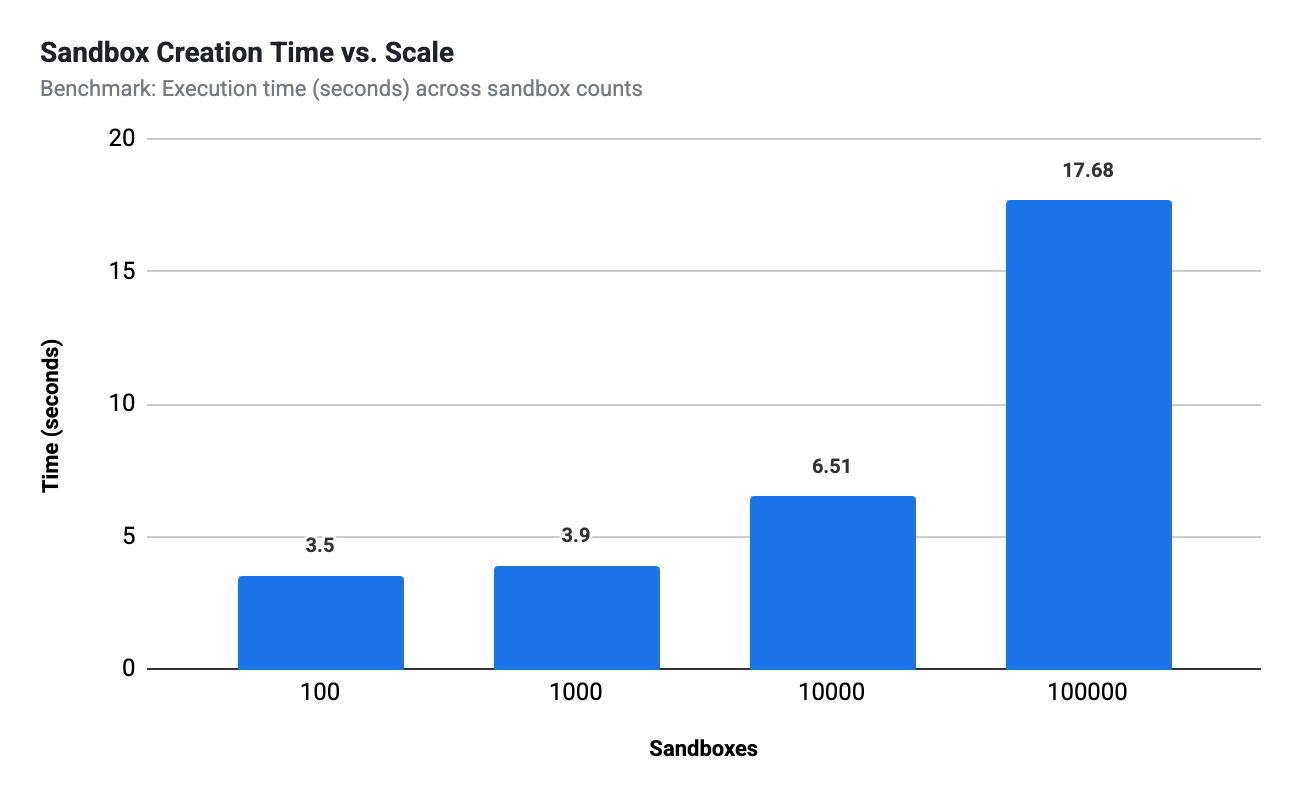
Because sandboxes are scheduled as part of a Ray cluster, they participate in the same resource management and autoscaling system as the rest of the workload. On Google Kubernetes Engine, we have scaled this architecture to 100,000 sandboxes in 20 seconds across thousands of nodes.
LinkSandboxes as Ray Primitives
Ray has become a common runtime for orchestrating post-training workloads. Frameworks including veRL, NeMo-RL, SLIME, MILES, and SkyRL already use Ray to coordinate distributed trainers, inference engines, rollout workers, and other components.
When we designed Ray Sandboxing, an important goal was to make it fit naturally into the existing Ray programming model rather than introduce a separate abstraction for isolated execution. A sandbox has many of the same properties as other resources managed by Ray: it needs to be placed on a machine, assigned resources, created and destroyed, recovered from failures, and scaled with the surrounding workload. This led us to represent each high-level sandbox through a Ray Actor:
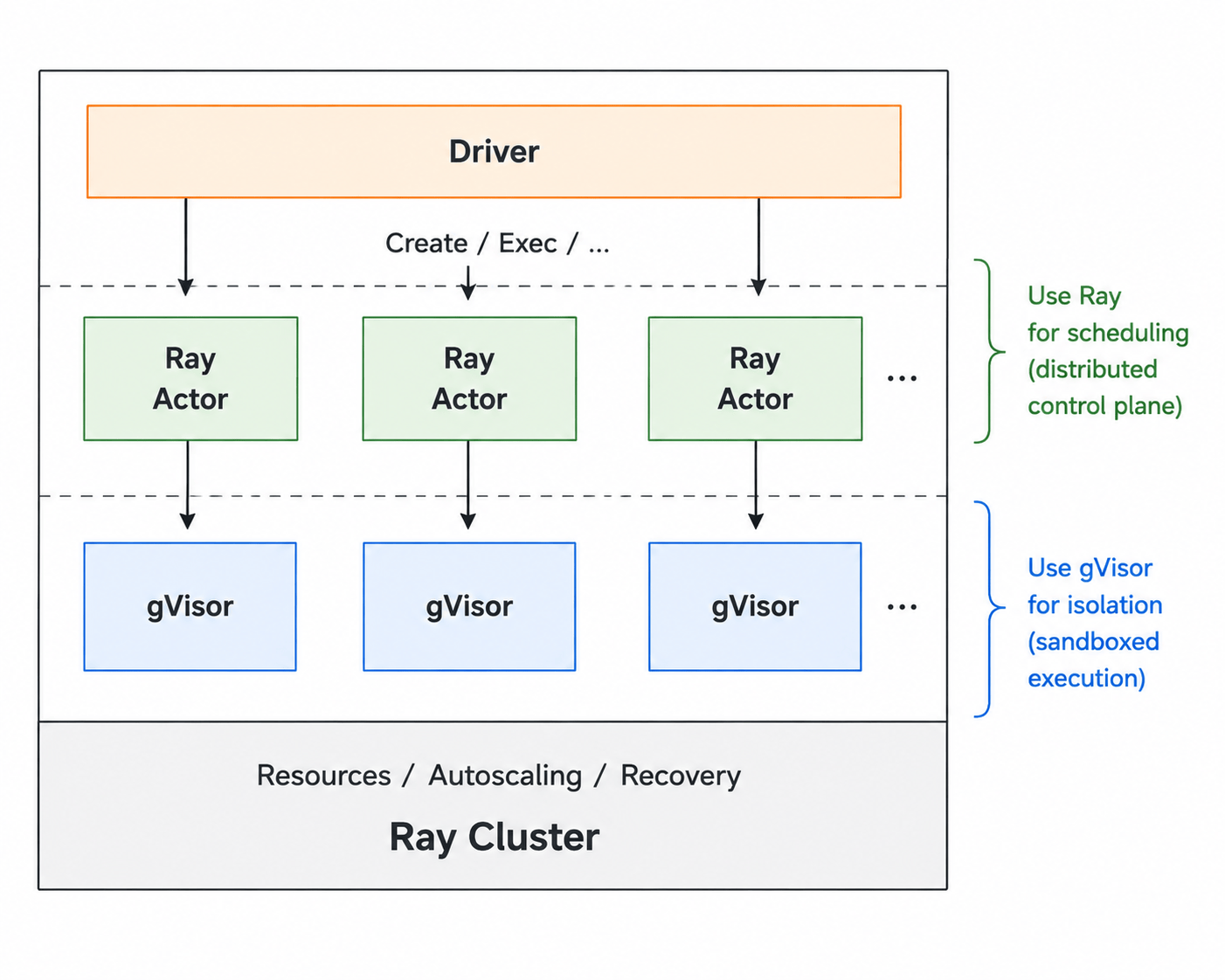
The Ray scheduler decides which node should run a sandbox and reserves the corresponding CPU and memory resources. The sandbox Actor manages its lifecycle, while gVisor provides the isolated execution environment on that node.
As a result, framework authors can manage sandboxed environments using the same Ray APIs and patterns they already use for the rest of their workload. For example:
import ray
from ray.experimental import sandbox

ray.init()
# Create a gVisor sandbox environment and return an actor handle for a proxy actor
sb = sandbox.create(
    cpu=1.0,
    memory="512Mi",
    image="python:3.12-slim"
)
# Execute code inside the sandbox
result = ray.get(sb.exec.remote("python -c 'import sys; print(sys.version)'"))
print(result.stdout)
This creates a gVisor sandbox from an OCI-compatible image and returns a Ray Actor handle. Calls to exec are normal Ray Actor calls, so the sandbox can live anywhere in the cluster. The created actor is a proxy that will forward the operations to gVisor.
The sandbox API covers the basic lifecycle needed by agentic workloads:
create environments from OCI container images,
set CPU and memory limits,
configure environment variables, working directories, and networking,
execute commands,
read, write, upload, and download files,
inspect sandbox state, and
terminate or delete environments.
For lower-level use cases, SandboxRuntime provides direct access to local gVisor sandboxes and lets users modify the OCI specification before it is handed to gVisor. Here is an example how this API can be used to build a pool of local sandboxes inside of an actor:
import ray
from ray.experimental.sandbox.runtime import SandboxRuntime

@ray.remote
class SandboxPool:
    def __init__(self, size: int = 3, image: str = "python:3.10-slim"):
        self.runtime = SandboxRuntime()
        self.sandboxes = [
            self.runtime.create(image=image, memory="512Mi")
            for _ in range(size)
        ]

    def run_command(self, index: int, command: str):
        return self.runtime.exec(self.sandboxes[index], command)

    def close(self):
        for sb_id in self.sandboxes:
            self.runtime.delete(sb_id)

# Deploy an actor managing a pool of local sandboxes
pool = SandboxPool.remote(size=3)
result = ray.get(pool.run_command.remote(0, "python3 -c 'print(\"Hello from pool!\")'"))
print(result.stdout)
ray.get(pool.close.remote())LinkScaling to 100,000 Sandboxes
Integrating sandboxing into Ray becomes especially useful when the number of environments grows.
Large-scale RL workloads may need thousands of environments running concurrently, with environments continually being created and destroyed as rollouts progress. A separate sandbox service introduces another scheduler and another distributed control plane that needs to scale alongside the training system.
With Ray Sandboxes, environment placement is simply another scheduling problem for Ray.
When running Ray on Google Kubernetes Engine, we have scaled the system to 100,000 gVisor sandboxes in 20 seconds, distributed across thousands of nodes.
LinkWhy gVisor?
Running model-generated code means treating the code inside the environment as untrusted.
Ray Sandboxing uses gVisor, Google's open-source application kernel, as its initial sandbox runtime. gVisor implements a substantial portion of the Linux system-call interface in userspace, putting an additional isolation boundary between workloads and the host kernel.
It is OCI-compatible, works with standard container images, and does not require exposing a Docker daemon or host Docker socket to the sandbox.
This combination is particularly useful for agentic workloads: environments remain lightweight enough to create dynamically while providing stronger isolation than executing generated code directly in ordinary containers.
gVisor also provides sub-second sandbox startup and low per-sandbox memory overhead, making it possible to use sandboxes as relatively fine-grained distributed resources.
LinkCommon Patterns for Real-World Workloads
Creating an isolated process is only one part of running real agent workloads. Environments often need different network policies, files and artifacts need to move between the agent and the sandbox, and external systems need a way to invoke sandboxed execution.
Ray Sandboxing includes primitives for each of these patterns.
Link1. Network isolation
Not every sandbox needs the same level of connectivity. An agent may need internet access to call APIs or install packages, while an evaluator running untrusted code should stay isolated. Ray supports four network modes:
network="none" (default): Loopback only. Best for isolated rollouts and untrusted code.
network="public": Internet egress with a portable /etc/resolv.conf. Useful for API calls and package installation.
network="host": Shares the node's network namespace, allowing access to node-local services.
network="sandbox": Uses gVisor's isolated network stack and requires rootless=False.
from ray.experimental import sandbox

sb = sandbox.create(
    image="python:3.12-slim",
    network="public",
    dns=["10.0.0.2"],
    readonly=False,
)
ray.get(sb.exec.remote("pip install requests"))Link2. Move files and state
In real workloads, you usually need to move more than command strings into a sandbox. For small files, you can read and write bytes directly through the Actor. For larger directory trees, use an archive to preserve permissions, symlinks, and empty directories. Because file transfers go through Ray, they work even when the sandbox runs on a different physical node.
script_source = "print('Training complete')"
ray.get(sb.write_file.remote("/app/train.py", script_source))
metrics = ray.get(sb.read_file.remote("/app/metrics.json"))

ray.get(sb.upload_file.remote("bundle.tar.gz", "/tmp/bundle.tar.gz"))
ray.get(
    sb.exec.remote(
        "mkdir -p /app && tar -xzf /tmp/bundle.tar.gz -C /app"
    )
)Link3. Expose sandboxed execution through MCP
Ray Sandboxes can also sit behind an MCP tool, giving MCP-compatible agents a safe way to execute untrusted code without exposing the host environment. The agent only interacts with the tool. Ray and gVisor handle the isolation underneath.
from mcp.server.fastmcp import FastMCP

mcp = FastMCP("sandboxed-python")
isolated_sb = sandbox.create(
    image="python:3.12-slim",
    network="none",
)

@mcp.tool()
def run_python(code: str) -> str:
    """Run untrusted Python inside a gVisor sandbox."""
    result = ray.get(
        isolated_sb.exec.remote(
            ["python", "-c", code],
            timeout=30,
        )
    )
return result.stdout if result.exit_code == 0 else result.stderrLink4. Reduce sandbox privileges
For stricter isolation, pass capabilities=[] to remove Linux capabilities from the sandbox. Even a root user inside it will then be unable to perform operations such as chown, mknod, or opening raw sockets. If you need lower-level control, _oci_spec_transform_fn lets you modify the OCI spec before it reaches gVisor. For example, to remove capabilities or enforce process limits:
from ray.experimental.sandbox.runtime import SandboxRuntime

def harden_spec(spec):
    # Limit process creation to reduce fork-bomb risk.
    spec["process"]["rlimits"] = [
        {"type": "RLIMIT_NPROC", "hard": 64, "soft": 64}
    ]
    # Remove all Linux capabilities.
    if "capabilities" in spec["process"]:
        for cap_type in spec["process"]["capabilities"]:
            spec["process"]["capabilities"][cap_type] = []
    return spec

runtime = SandboxRuntime()
sb_id = runtime.create(
    image="python:3.12-slim",
    _oci_spec_transform_fn=harden_spec,
)LinkRun Ray Sandboxes with harbor
Harbor is a framework for evaluating coding agents such as Claude Code, OpenHands, and Codex CLI on benchmarks including SWE-Bench and Terminal-Bench. Each trial runs inside an isolated task environment.
Ray Sandbox is available as a native Harbor environment. Run Harbor in a Ray cluster, and trials run their task images under gVisor on your own nodes, with the task's network policy enforced by the sandbox.
LinkInstall and Run
Using Harbor with Ray Sandboxing requires Ray 2.58+ and runsc installed on the Ray base image.
# Install Harbor with the Ray backend
pip install 'harbor[ray]'

# Run an evaluation on Ray
harbor run --dataset terminal-bench@2.0 \
 --agent claude-code \
 --model anthropic/claude-opus-4-1 \
 -e ray \
--n-concurrent 32LinkStatus and Performance
Tasks with a public [environment].docker_image (e.g., MedAgentBench) work out of the box. Benchmarks like Terminal-Bench or SWE-Bench require per-task images to be published to a reachable registry. Compose, GPU, or allowlist-based tasks are currently rejected.
Performance metrics on a single 14-CPU dev VM:
Single trial: 29s
8 trials at concurrency 4: 8/8 reward 1.0, 0 exceptions, 3m02s (per-trial p50 45s)
Throughput is typically memory-bound per node and scales horizontally via the Ray autoscaler per cluster.
LinkHow it works
Harbor's environment model maps directly onto Ray Sandbox:
Permissions: Task images run with Docker-compatible capabilities so existing benchmark images behave as expected.
Execution: String commands preserve Harbor's bash -c semantics.
File transfer: Directory uploads are packaged as tar archives and transferred through the sandbox file APIs.
Resources: Harbor resource requests become Ray scheduling reservations, while runtime limits are enforced inside the sandbox.
Networking: Harbor's no-network policy maps to network="none". Attempts to override it with broader access are rejected before sandbox creation.
LinkWhat's Next
Ray Sandboxing is currently experimental, and there are several areas we would like to develop further with the community.
REST API Service: We are planning to implement a REST API so users can interact with sandboxes without requiring Ray as a dependency, and enable separating training and sandboxing clusters and run sandboxes as a service. A prototype is available in this PR.
GPU support. Ray is already widely used for scheduling mixed CPU and GPU workloads and gVisor works well with GPUs. We would like GPU-backed sandboxes to work out of the box as workloads such as kernel generation and RSI become increasingly important.
Docker support inside the sandbox. Some agent tasks themselves expect access to Docker. gVisor supports running Docker inside a sandbox, and we would like to document and test a configuration that works naturally with Ray Sandboxing.
Network and filesystem capabilities. We would like to add functionality including filesystem snapshots and exposing ports between a sandbox and its host, or between sandboxes.
Security guidelines. gVisor provides a mature security architecture, but the security properties of the overall system still depend on how the sandbox and surrounding infrastructure are configured. We would like to develop clear recommended configurations and examples, including configurations intended for workloads in which models may actively attempt to escape the sandbox.
If you are interested in any of these projects or have feedback about them, we would love to hear from you (e.g. by creating a github issue or PR).
LinkTry it
Ray Sandboxing is available experimentally starting with Ray 2.58.
If you are building agentic RL systems, coding-agent evaluations, or other workloads that need large-scale isolated execution, we would love for you to try it and tell us what is missing.
See the Ray Sandboxing Guide to get started on K8s.
For feedback, feature requests, or contributions, join the discussion on GitHub.
Our goal is to make sandboxed environments feel like any other distributed primitive in Ray: easy to create, easy to scale, and easy to compose with the rest of an agentic workload.
Table of contents
- Sandboxes as Ray Primitives
- Scaling to 100,000 Sandboxes
- Why gVisor?
- Common Patterns for Real-World Workloads
- 1. Network isolation
- 2. Move files and state
- 3. Expose sandboxed execution through MCP
- 4. Reduce sandbox privileges
- Run Ray Sandboxes with harbor
- Install and Run
- Status and Performance
- How it works
- What's Next
- Try it