Debugging Ray on Anyscale with Agent Skills with only one prompt
My Ray Data and vLLM pipeline that captions video frames won’t start. vLLM bails during engine initialization: it can’t fit a KV cache for Qwen2.5-VL-7B on the 24 GB L4, and the number it prints for free cache memory is negative. I have a pipeline.py, a job spec pinning L4 GPU workers, a 7B vision-language model, and a line that reads MAX_MODEL_LEN = 32768. One of those numbers is wrong for the others, but which, and to what value? The startup log dead-ends in an allocator error, the vLLM memory docs are open in one browser tab, a half-remembered GitHub issue about KV-cache sizing in another. The actual debugging (work out how many tokens the workload really needs, how much the card can hold, and which knob to turn) is mechanical work. It just takes hours of doc-diving.
Most of that work shouldn’t need a human. Anyscale just shipped a set of agent skills for exactly this, available through its CLI for use with the coding agent of your choice: Claude Code, Cursor, Codex, and others.
Today I want to show, not tell. One file, one prompt, and /anyscale-platform-fix takes the pipeline from won’t-start to a validated production job. What follows is my actual session, condensed.
LinkWhat Anyscale shipped
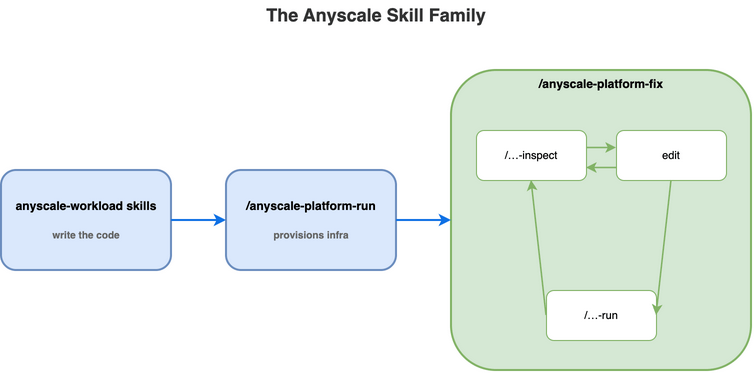
Anyscale ships two families of skills. Workload skills write the Ray and Anyscale code itself: a Ray Train loop, a Ray Serve deployment, a Ray Data pipeline. Platform skills run that code on Anyscale, inspect it when something goes wrong, and fix it. This post is about the platform skills, and specifically about the two debugging skills (/anyscale-platform-inspect and /anyscale-platform-fix) you reach for when a workload misbehaves.
Three user-invocable platform skills, ready to drop into your coding agent:
/anyscale-platform-fix: debug and fix failing workloads end-to-end. The orchestrator.
/anyscale-platform-inspect: read-only diagnosis. Static validation of local directories, live inspection of running workloads via the Anyscale API, log/event/metric retrieval, source-grounded reports.
/anyscale-platform-run: generate Anyscale configs and execute. Workspace setup, service deploy, job submit.
Install once, via the Anyscale CLI:
anyscale skills installSee the install guide for prerequisites. Open your coding agent in any project and the three slash commands are available.
LinkThe walkthrough: my video-captioning pipeline won’t start
Back to that pipeline. I’m sitting in the repo where pipeline.py lives, and my entire prompt is one line:
/anyscale-platform-fix pipeline.pyFrom here on, every step below is the agent’s. I type that line, answer when the agent stops to ask (the skill never invents a choice that carries real trade-offs; it surfaces it), and give a few quick go-aheads in between. Everything else (inspect, reproduce, diagnose, edit, re-run, validate) the agent does on its own, following the fixed loop the skill defines.
Link1. Static validation first
Before touching a cluster, the agent runs a static pass over the project, calling /anyscale-platform-inspect on the directory pipeline.py lives in.
By the way:
/anyscale-platform-inspectis the read-only half of the toolkit. Hand it a directory, a job/service/workspace ID, a console URL, or even a pasted error string, and it pulls logs, events, metrics, and state, grounds what it finds against Ray and Anyscale source, and hands back a structured report. It never edits or deploys anything; that’s/anyscale-platform-fix’s job.
This time something does come back, just not a blocking bug. The agent grounds the Ray Data LLM API against Ray 2.54.0 source and confirms the code is sound: the ray.data.llm imports resolve, vLLMEngineProcessorConfig is used correctly, the job YAML and the Dockerfile validate. What it can’t settle without a live run are three runtime risks it flags anyway: a numpy==2.x pin that could break torch and vLLM’s ABI at install, an apt package (libgl1-mesa-glx) that’s been renamed since the base image was cut, and, most important, MAX_MODEL_LEN = 32768 against a 24 GB L4, which looks like it’ll leave no room for a KV cache. Static analysis can name the risk; only a run settles it. So the agent surfaces the three and asks me how to proceed.
 Static validation needs no API calls, but the agent still grounds every claim about ray.data.llm and vLLMEngineProcessorConfig against Ray 2.54.0 source.
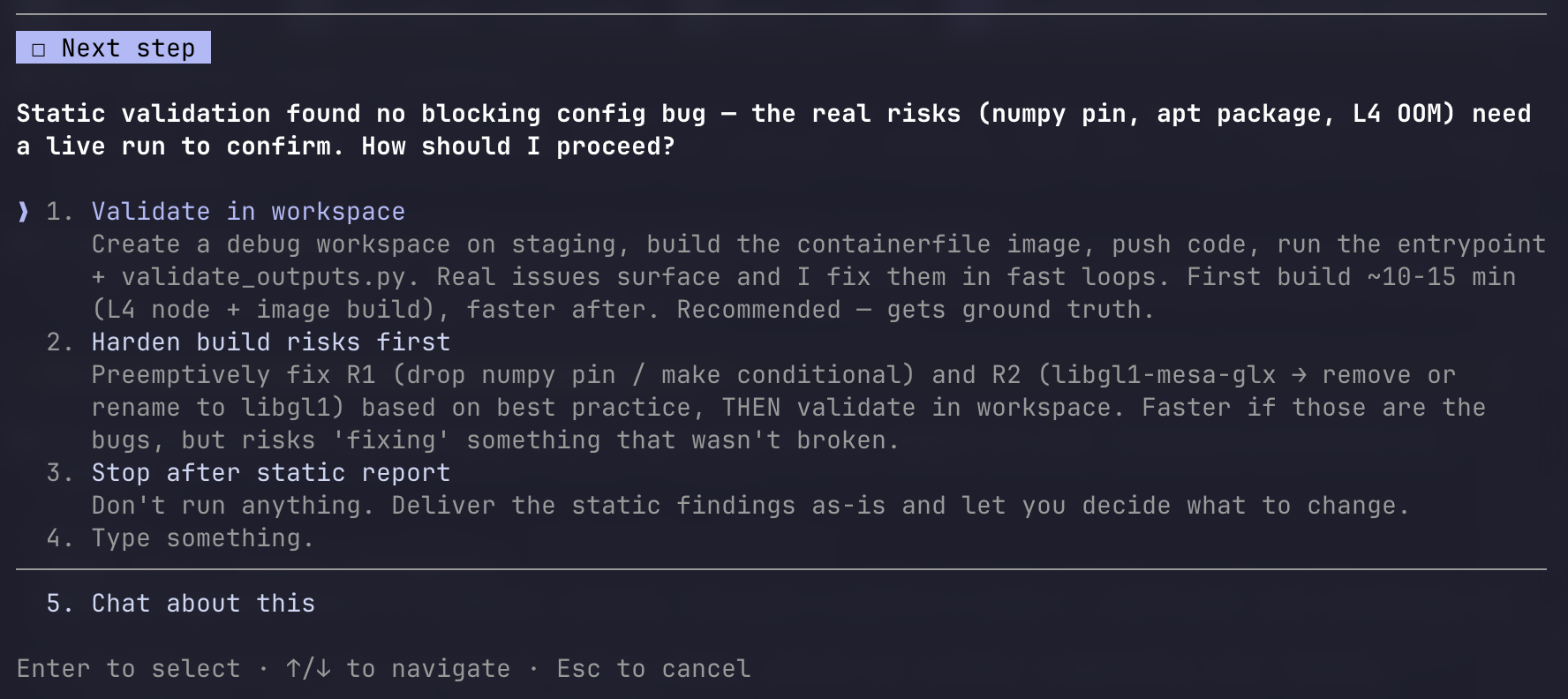 The first of four times the agent stops to ask. Static found no blocking bug, only risks, so it asks whether to confirm them on a live workspace.
Link2. Push to a workspace and reproduce
I pick “validate in workspace”; static can only flag the risks, but a run confirms them. The agent moves into the execution skill, builds the image, and brings up a debug-video-frame-captioning workspace on an L4 to run python pipeline.py, calling /anyscale-platform-run to do it.
Another aside:
/anyscale-platform-runis the execution half. It turns a workload directory into the right Anyscale artifact (workspace.yaml, service.yaml, or job.yaml), runs the anyscale command, and waits for the workload to reach the state it should./anyscale-platform-fixleans on it for every push, re-run, and final deploy.
 Into the execution skill: per its own rules, the agent reads the config and cloud references before generating a single line of YAML.
The build finishes, the workspace comes up, and the run gets as far as constructing the vLLM engine, where it stops cold. vLLM’s startup profiler does its pass and finds that, after loading Qwen2.5-VL-7B’s weights, the KV cache it would need for MAX_MODEL_LEN = 32768 doesn’t fit: available cache memory comes out negative, about −0.24 GiB. The engine declines to start. This is the cleanest kind of failure to catch: not a mid-run OOM an hour in, but the engine refusing to initialize at all, in the first couple of minutes, every time.
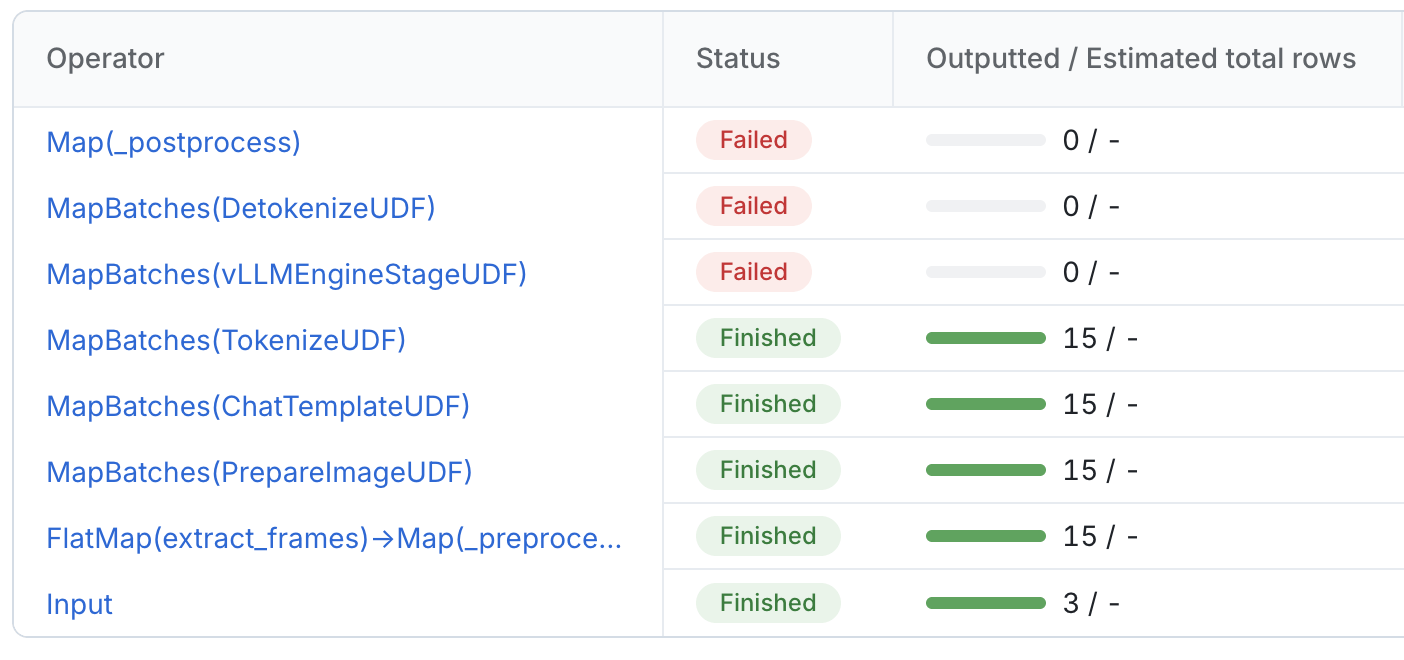 The operator view tells the story at a glance. Frame extraction and the four preprocessing stages each cleared 15 rows; the run died the moment it reached vLLMEngineStageUDF, taking detokenize and postprocess down with it.
 The error itself, before a single caption is generated: vLLM’s own KV-cache check refuses to start the engine.
Worth a note before the diagnosis:
/anyscale-platform-inspectand/anyscale-platform-runare user-invocable on their own, and/anyscale-platform-fixjust chains them with the loop and the asks in between. Want a one-off postmortem?/anyscale-platform-inspect prodjob_<id>is a prompt by itself; same for/anyscale-platform-runwhen you only need to deploy a workload.
Link3. Apply the fix: when there’s more than one right answer
The error is specific enough to act on, and the agent grounds the fix against vLLM’s own memory-budgeting code before proposing anything. The arithmetic is unforgiving: the L4 has 24 GB; at the default gpu_memory_utilization of 0.9, vLLM gets about 21.6 GB; Qwen2.5-VL-7B’s weights take roughly 14–15 GB; and MAX_MODEL_LEN = 32768 makes vLLM reserve room for a 32K-token sequence’s activations and cache on top of that, which is what tips the available cache memory below zero. The fix space is small, but more than one move is defensible, so the skill stops and asks me.
Lower max_model_len to 8192 (recommended). Single-frame captioning needs only a couple thousand tokens (the image, the prompt, and 256 of output), so 32,768 is about 16× more context than the workload will ever use. Dropping it shrinks both the profiling peak and the per-sequence cache, with no hit to quality or throughput.
max_model_len 8192 plus enforce_eager=True. The same change, plus skipping CUDA-graph capture to free roughly another 1.3 GB: a guaranteed-headroom version, at a little per-request latency.
Raise gpu_memory_utilization to 0.95. The smallest edit, and it keeps the full 32K context, but it buys only ~1.2 GB and leaves almost nothing for CUDA and the OS, risking a harder crash later. The riskiest of the three.
I take the first option. Nothing this pipeline captions comes near 8,192 tokens, so the cap costs nothing and the fix is a single number: MAX_MODEL_LEN = 32768 becomes MAX_MODEL_LEN = 8192, with a comment noting it fits the L4’s KV cache. No refactor, no “while we’re here” cleanup; the rest of pipeline.py is left exactly as it was.
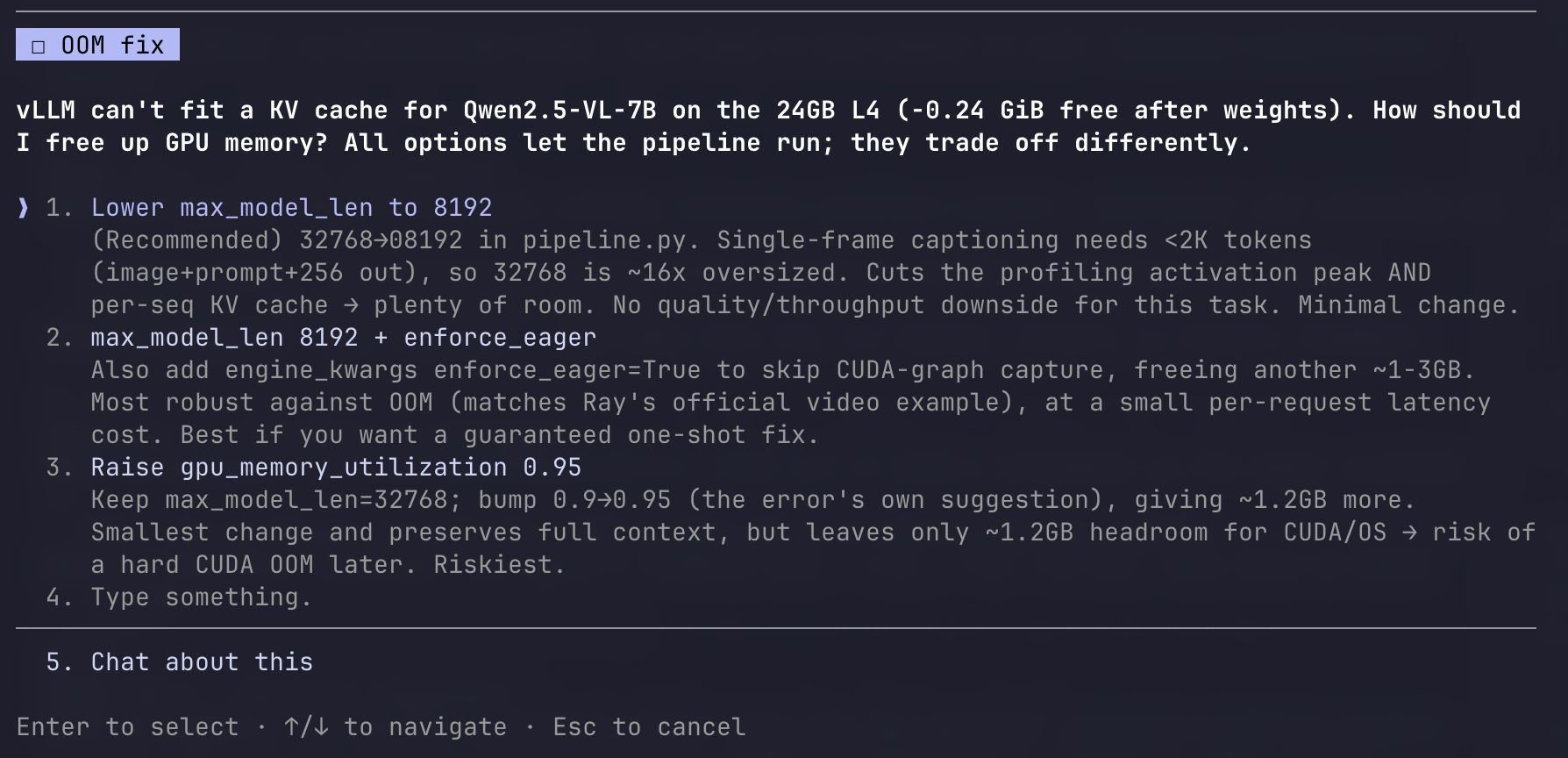 The real decision of the session. vLLM can’t fit a KV cache for Qwen2.5-VL-7B on the 24 GB L4 (−0.24 GiB free after weights); the agent lays out three ways to free memory and recommends the cleanest.
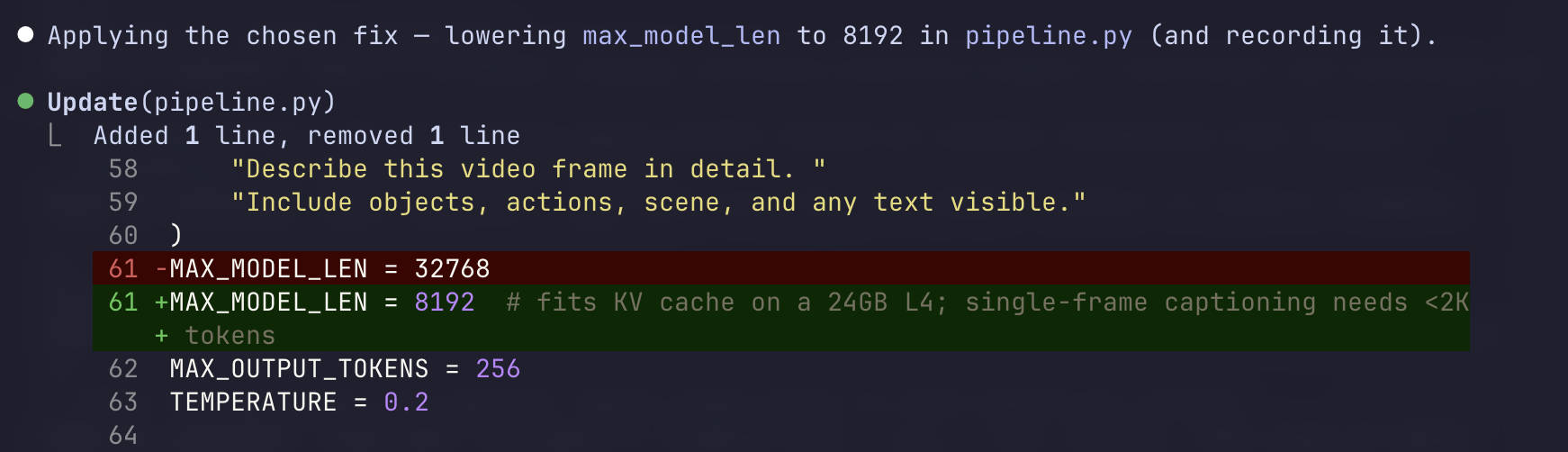 One constant, one comment: the agent applies the chosen fix in pipeline.py and records it in its notes.
Link4. Re-run on the workspace
The agent doesn’t wait to be told to re-test; verifying its own fix is part of the loop. It pushes the edit back to the same warm workspace and runs python pipeline.py again.
This time the engine initializes cleanly. vLLM now reports 1.96 GiB of KV cache available, room for 36,688 tokens, where the number was negative before. The pipeline runs end to end, and the captions come back concrete: frame 0 of the first clip is “a black-and-white character that appears to be Goofy, a well-known Disney animated character”; a frame a second later, “an animated character, Goofy, from Disney’s classic series, standing on a dark surface.” The bundled validate_outputs.py passes: schema intact, caption lengths 319–716 characters, no nulls.
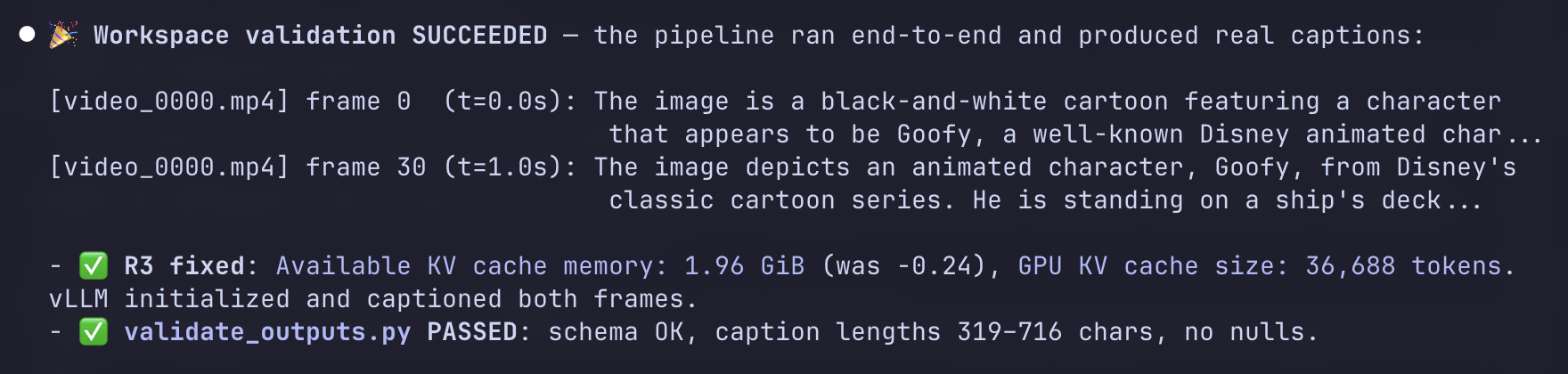 The fix lands: KV cache 1.96 GiB free (was −0.24), real captions generated, validate_outputs.py PASSED.
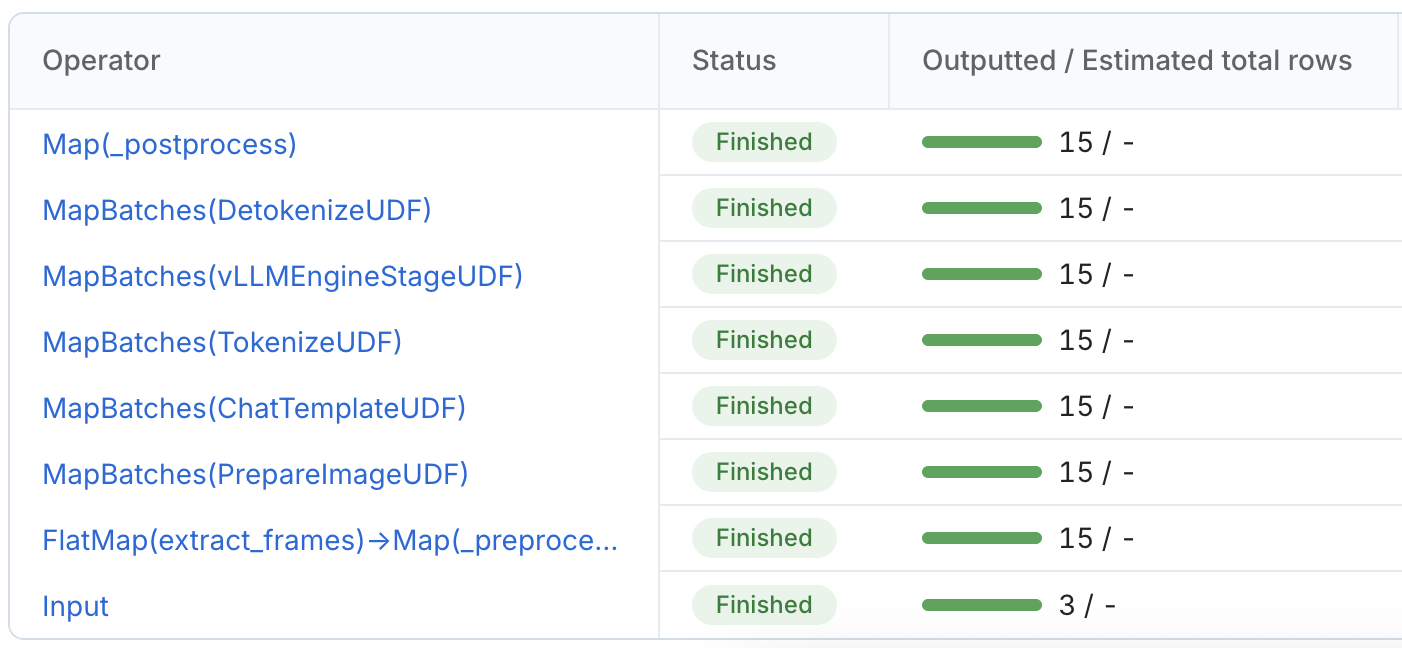 The same operator view as before, now green the whole way down. vLLMEngineStageUDF and the two stages below it clear 15 rows instead of failing at zero.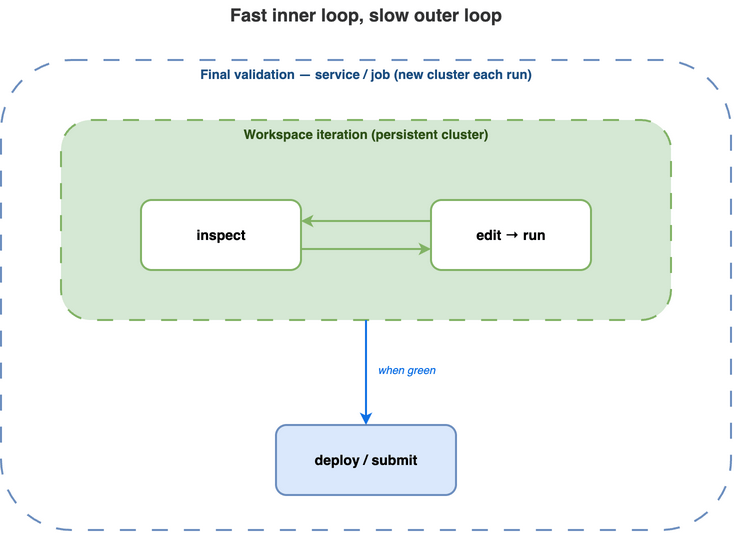
Staying on the workspace is the point. The first build (an L4 node plus the image) took ten to fifteen minutes, but with the cluster warm, applying the one-line fix and re-running took minutes, not another cluster spin-up. Iterating against a fresh job cluster instead, where every attempt waits on a cold start and a rebuild, would have turned a single fix-and-check cycle into the better part of an hour.
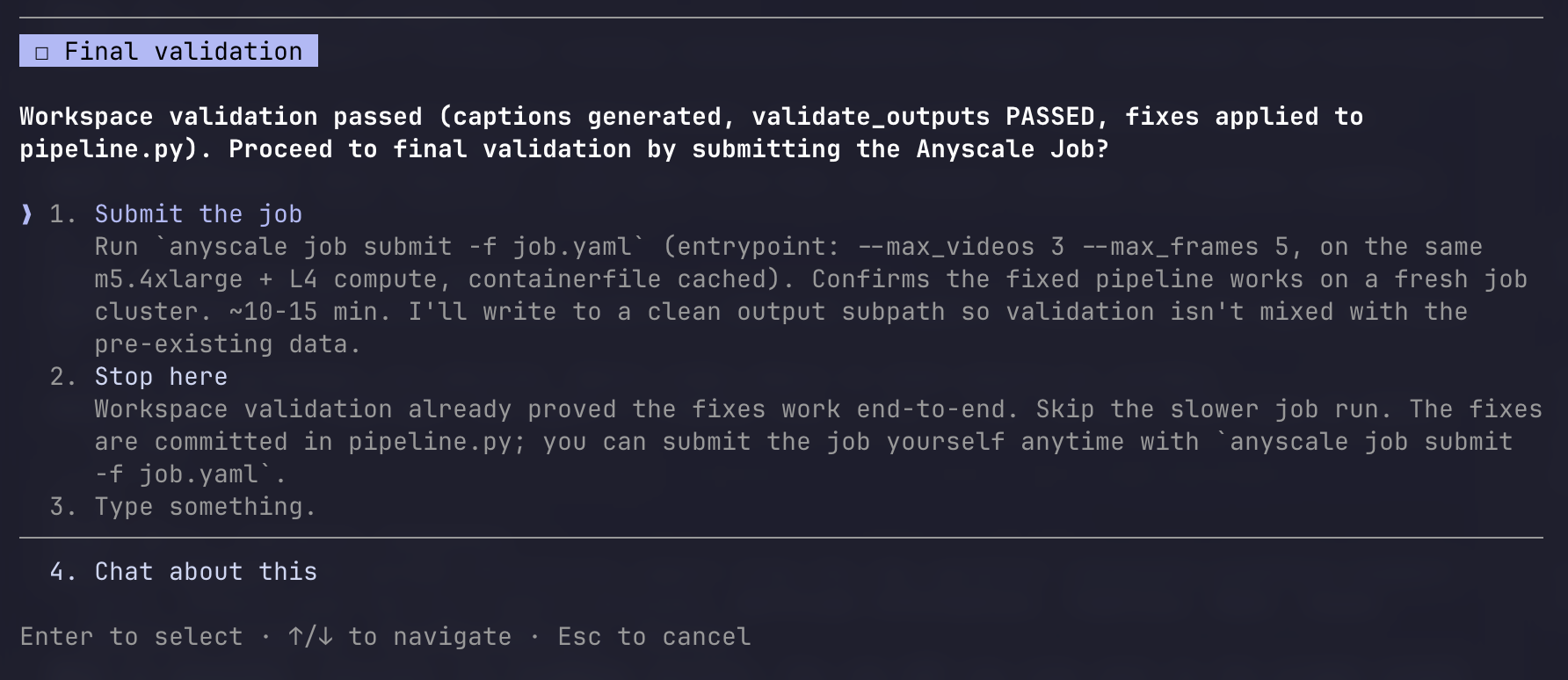 Workspace clean. Before promoting anything to a fresh production cluster, the agent asks again.
Link5. Final validation: submit as a job
I say submit. The agent runs /anyscale-platform-run submit pipeline.py as a job, which generates the job config and hands it to anyscale job submit. This is the slow outer loop, and it runs exactly once: a brand-new job cluster comes up from nothing, runs the fixed pipeline end to end, and finishes in about six minutes forty. validate_outputs.py runs again on the clean output path: 15 rows, exactly three videos times five frames, schema intact, captions 403–615 characters, PASS.
 Final validation on a fresh cluster: RUNNING → SUCCEEDED, 15 rows (3 videos × 5 frames), schema PASS.
Link6. Cleanup
With the job green, the agent doesn’t just stop; it accounts for what the session left behind. The debug workspace is still up and still billing; the job’s cluster already auto-terminated. The agent lays out the choices: terminate the workspace but keep the built image and the debug output, terminate everything including the image and output directory, or leave it all running. I take the recommended path, terminating the workspace and keeping the rest, so billing stops while the image and outputs stay for reference.
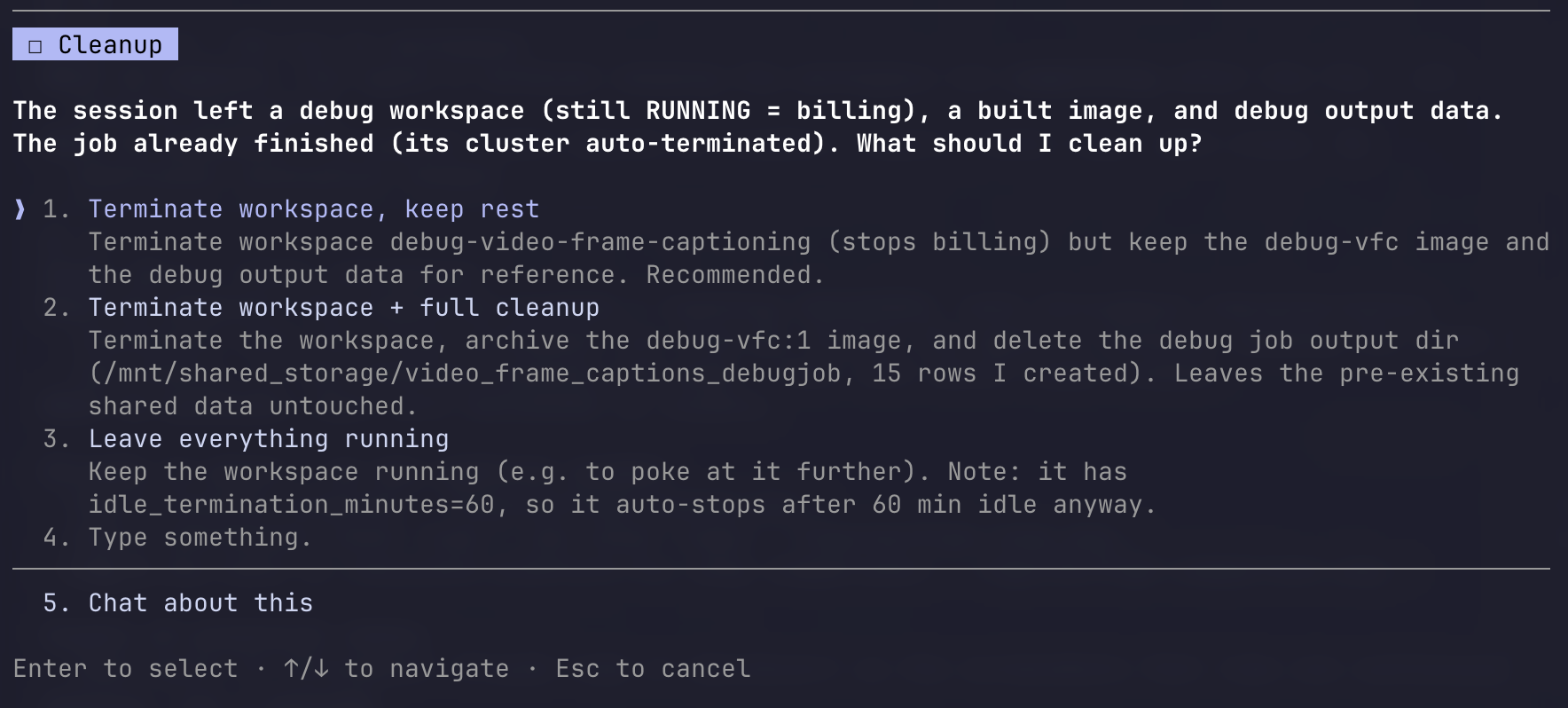 The fourth and last ask. The agent won’t silently leave a billing workspace running; it surfaces the cleanup options and lets me choose.
Then the agent writes up what happened, and the wrap-up has a twist: there were two bugs, not one. The KV-cache OOM you watched it fix was actually the second wall. The first was quieter: the HuggingFace model download had hung on the GPU workers, because the runtime environment was missing HF_HUB_DISABLE_XET=1, a known incompatibility between recent numpy builds and HuggingFace’s xet transfer backend. The agent recognized the hang, set the variable on both the driver and the vLLM workers’ runtime environment, and only then got far enough to hit the KV-cache OOM. Both fixes live in the same pipeline.py. That second one is an afternoon of issue-tracker archaeology for a human; the agent had seen the signature and grounded the fix against the known issue.
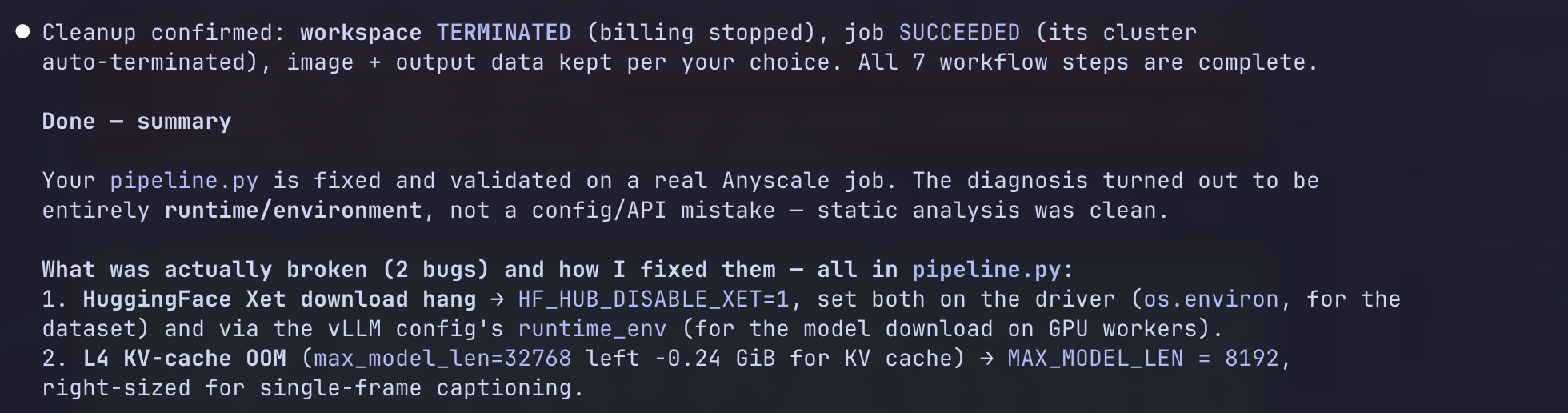 The agent’s wrap-up names two bugs, both in pipeline.py: the HF_HUB_DISABLE_XET download hang and the MAX_MODEL_LEN KV-cache OOM.
By the way: the skill keeps a
notes-<workload>-<date>.mdfile as it works, recording each step, the static-validation findings, the runtime risks, the errors it hits, and the fixes it applies. These sessions can run long; if the agent’s context compacts partway through (or you close the window and come back tomorrow), it rebuilds its bearings from that file instead of starting over.
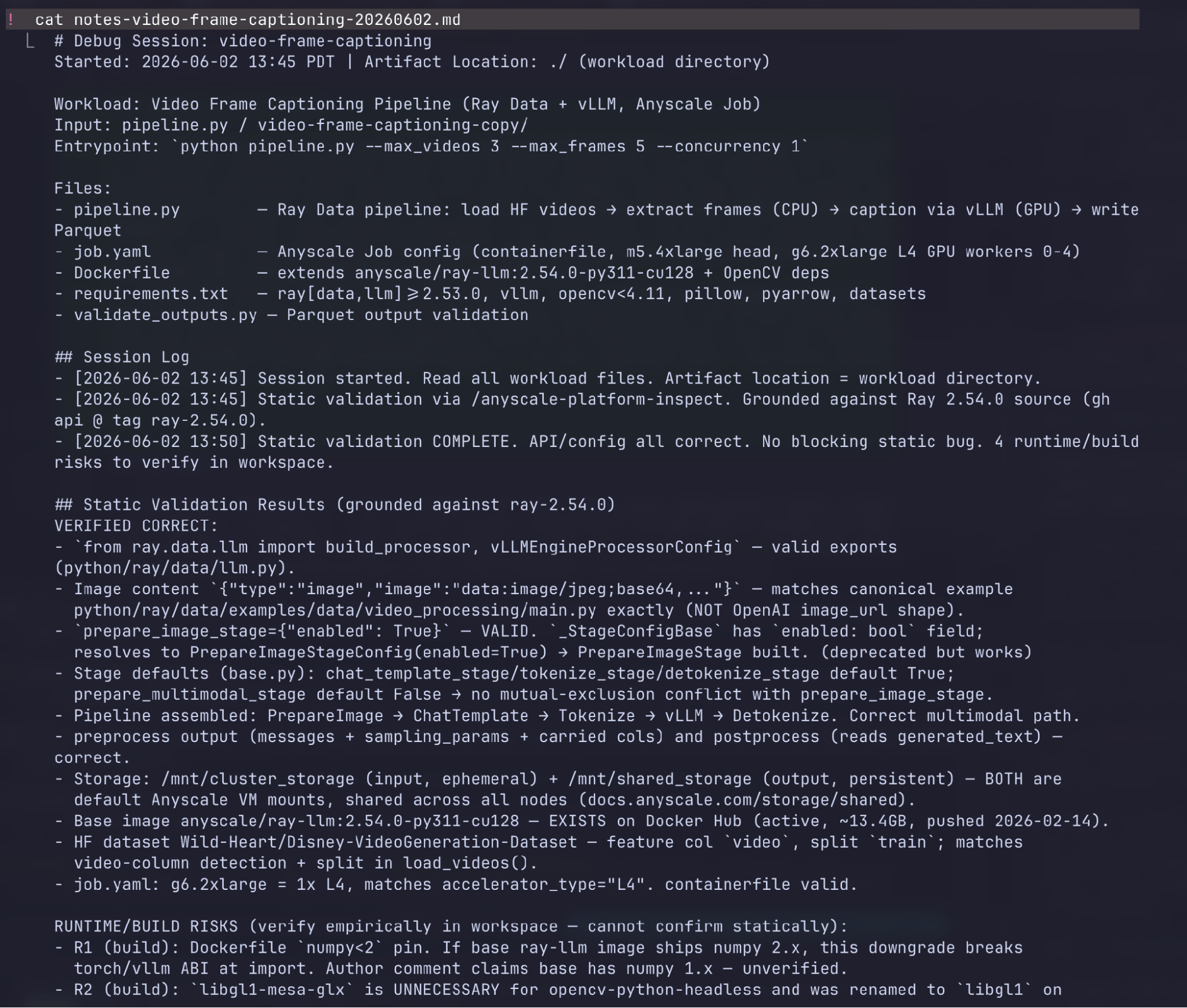 The trail the skill kept: a notes file recording the session log, the source-grounded static findings, and every runtime risk.
LinkFour minutes of your attention, not an afternoon of it
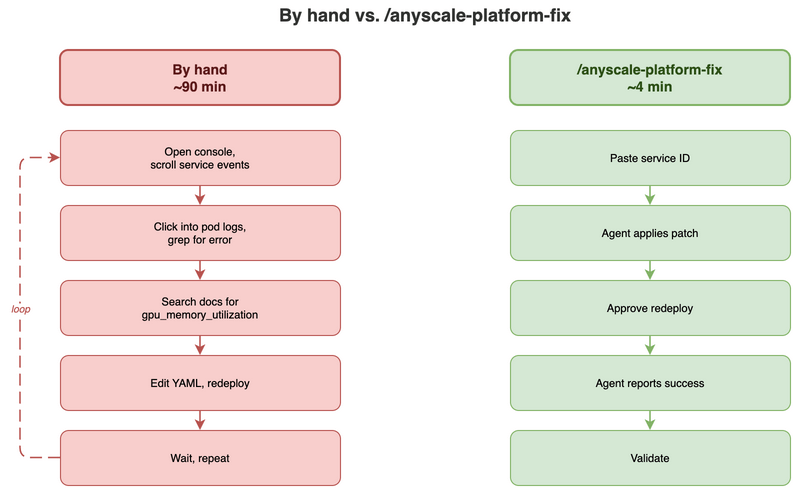
Add up my side of that session: one prompt, a handful of decisions, and a few quick go-aheads. Four minutes of attention, not four minutes of wall-clock, since clusters still have to build and jobs still have to run, but four minutes of mine, spread across the four times the agent stopped to ask. Every step the agent took, a human could take too: ground the API against the right Ray version, build and run on a workspace, read the engine-init log, work out how vLLM carves up the L4’s memory, change one constant, re-run, submit the job, validate. Done by hand it’s the better part of an afternoon, most of it spent on an engine-init log, a vLLM allocator error, and an xet-ABI known-issue trail you’d otherwise have to dig out of a tracker. The agent’s edge isn’t that it knows something you don’t; it’s that it stitches those steps into one prompt, composes the same /anyscale-platform-inspect and /anyscale-platform-run skills you’d reach for, grounds every claim in source instead of guessing, and stops to ask you the questions that actually need a human.
LinkTry it
Install the skills once:
anyscale skills installThen, in any coding agent session, three prompts to start with:
/anyscale-platform-fix prodjob_<your-failing-job>
/anyscale-platform-inspect <console-url-of-service> why did E2E latency peak so high and how to mitigate ?
/anyscale-platform-run deploy ./my_service/ as a service
Table of contents
- What Anyscale shipped
- The walkthrough: my video-captioning pipeline won’t start
- 1. Static validation first
- 2. Push to a workspace and reproduce
- 3. Apply the fix: when there’s more than one right answer
- 4. Re-run on the workspace
- 5. Final validation: submit as a job
- 6. Cleanup
- Four minutes of your attention, not an afternoon of it
- Try it