Introducing the Anyscale Physical AI Skill
Today we are introducing the Anyscale Physical AI Skill, a new workload skill for building robotics and autonomous-driving systems with Ray and Anyscale. It scopes the workload with you, makes the hard systems decisions explicit, and generates the code, dependency pins, compute configuration, and launch instructions needed to run it. It extends Anyscale Agent Skills into physical AI, following the LLM post-training skill.
LinkSupported physical AI workloads, models, and simulation environments
The Physical AI Skill covers six distinct workload classes. Here, offline/open-loop RL post-training means the policy generates candidate trajectories but receives rewards from logged data without acting in an environment. Online/closed-loop RL post-training means the policy acts inside a simulator and learns from the resulting state transitions. This is an environment-interaction distinction—not a claim that the open-loop path implements classical offline-RL algorithms such as CQL or IQL.
Workload | Model families | Data or simulation environment | Ray and training stack |
VLA fine-tuning (imitation learning / SFT) | π0/π0.5, SmolVLA, OpenVLA-7B, GR00T-N1.5/N1.7, Alpamayo-1.5, and Cosmos3-Nano in action-policy mode | LeRobot v3 robot demonstrations, PhysicalAI-AV driving data, and custom episodic video | Ray Train (DDP for smaller models; FSDP/FSDP2 for sharded full fine-tuning; LoRA and frozen-backbone strategies); Ray Data (disaggregated CPU video decoding when supported by the input pipeline) |
Offline/open-loop VLA RL post-training | Alpamayo-1.5-10B and other VLA policies with verifiable trajectory rewards | Logged PhysicalAI-AV trajectories, with no simulator in the training loop | Cosmos-RL (GRPO/RLVR training); vLLM (policy rollouts); Ray Core (policy and rollout placement on a multi-GPU worker) |
Online/closed-loop VLA RL post-training | Alpamayo-1.5-10B | AlpaGym, AlpaSim, and PhysicalAI-AV NuRec scenes, with rewards from post-action state transitions | Cosmos-RL (policy training); vLLM (policy rollouts); AlpaSim (simulation services); Ray Core (multi-GPU worker reservation and placement) |
Robot policy serving and closed-loop evaluation | π0/π0.5, GR00T-N1.5/N1.7, and Alpamayo-1.5 | LIBERO manipulation tasks, Isaac Lab on Isaac Sim, and AlpaSim autonomous-driving scenes | Ray Serve (HTTP policy endpoints); Ray Core (GPU-isolated simulator workers); AlpaSim (gRPC driver and runtime services) |
World-model and action-conditioned training | Cosmos-Predict2-2B, ResNet-18 + Transformer latent-dynamics models, V-JEPA/V-JEPA 2, and diffusion world models | LeRobot/FMB trajectories and multi-camera robot or autonomous-vehicle video | Ray Data (distributed preprocessing); Ray Train (distributed training); Ray actors (imagination rollouts and model-predictive control) |
Simulator-native RL, domain randomization, and sweeps | Pretrained Isaac humanoid policies, Brax PPO humanoid policies, and engine-native agents | Isaac Lab on Isaac Sim, MuJoCo MJX with Brax, and headless Unreal Engine 5.7 | Ray Core (one GPU task or actor per simulator or training process for policy optimization, robustness sweeps, and game-engine orchestration) |
Upstream resources: Cosmos-RL, AlpaSim, LIBERO, NVIDIA Isaac Lab, MuJoCo MJX, Brax, and Unreal Engine 5.7.
These model names describe the configurations exercised end to end, not a closed allowlist. For a new VLA or world model, the skill starts from the closest validated model size and workload architecture, then revalidates memory, dependencies, data adapters, and evaluation before launch.
LinkWhy physical AI, and why now?
Physical AI is reshaping robotics and autonomous driving at the same time. Vision-language-action (VLA) models such as openpi, SmolVLA, OpenVLA, GR00T, and Alpamayo 1.5 map camera observations, language, and state to robot or vehicle action trajectories. In robotics, these models are designed to generalize manipulation and humanoid behavior across tasks. In autonomous driving, Alpamayo 1.5 combines VLA reasoning with trajectory prediction to study long-tail driving scenarios. The potential industry impact is a shorter loop from robot or fleet data to training, simulation, evaluation, and deployment—not simply a better model checkpoint.
World foundation models are the other half of that development loop. Instead of only choosing the next action, they model and generate how an environment evolves over time, helping teams create synthetic training scenarios, predict future states, test action-conditioned outcomes, and train policies. NVIDIA Cosmos 3 marks an important development: the 16B Cosmos3-Nano and 64B Cosmos3-Super use a unified omnimodal Mixture-of-Transformers architecture to reason over and generate text, images, video, audio, and actions. For self-driving teams, that broadens the toolkit for long-tail scenario generation, future prediction, and driving-policy development; for robotics teams, the same foundation supports world simulation, embodied reasoning, and action learning across robot embodiments.
A single physical AI workload is a small distributed system in disguise. Fine-tuning one VLA means decoding thousands of MP4 clips on CPUs while sharding a multi-billion-parameter transformer across GPUs if the model is large. Post-training a world model adds multi-camera video pipelines, generation components, and large distributed checkpoints. Evaluating a policy means running a heavy GPU physics simulator in lockstep with a heavy GPU model, thousands of times over. Reinforcement learning can require all of the above at once—a trainer, a rollout engine, and sometimes a full driving simulator, all sharing a cluster and passing weights and observations back and forth. Get any layer wrong—the wrong GPU, a stale transformers pin, a gated checkpoint that never downloaded to the worker—and you find out hours into a run, not before it.
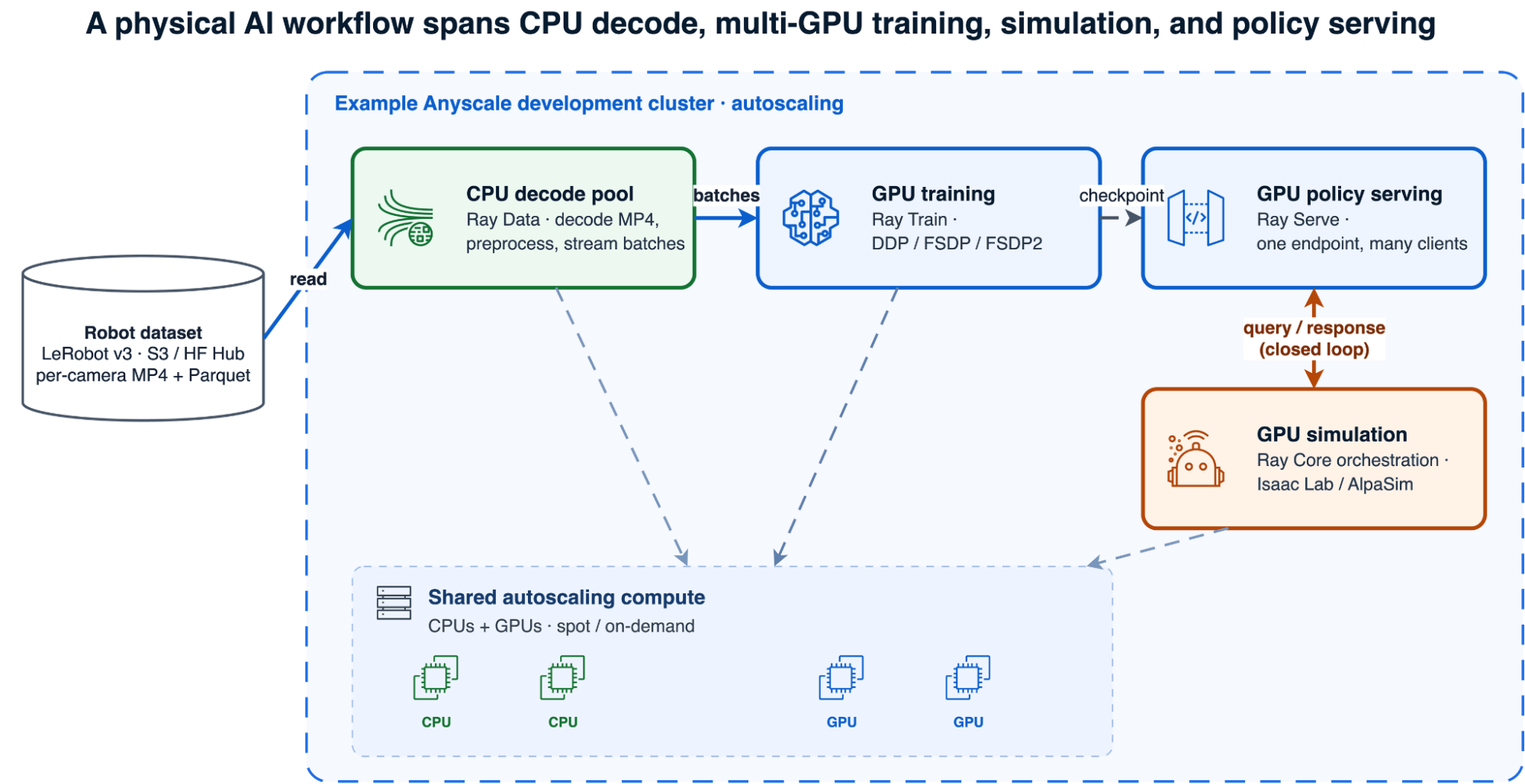 The heterogeneous physical AI stack
LinkWhat you get
A requirements-driven plan for the model, data, training strategy, evaluation method, deployment target, GPU shape, and expected run time.
Runnable Ray and Anyscale artifacts grounded in workload patterns tested end to end, rather than an infrastructure stack generated from scratch.
Validated systems guidance for memory sizing, dependency pins, gated model access, CPU/GPU separation, and simulator bring-up.
Standard code you own: Ray, PyTorch, LeRobot, Cosmos-RL, and simulator-native components—not a proprietary modeling abstraction.
The distinction matters: the supported configurations are grounded in successful runs, but every generated workload is specific to your model, dataset, cloud, and organization. Validate it in an Anyscale Workspace before promoting it to an unattended Job or production Service.
LinkWhy physical AI workloads are hard to operationalize
Robot-learning models and tools are becoming more accessible, but the systems burden grows quickly beyond a single-GPU tutorial. The same operational problems recur across workloads.
The compute is heterogeneous — inside one job. LeRobot-format datasets store video as per-camera MP4 files. Decoding them is a CPU-bound, memory-hungry job; training the policy is a GPU-bound job. Colocate the two and MP4 decode competes with a 30 GB training process for host RAM until the node OOMs. Closed-loop evaluation is worse: policy inference and physics simulation alternate step by step, each output feeding the next input, and each component needs deliberate GPU and process isolation.
Physical AI dependencies move as a unit, not one package at a time. A workload can combine model code, dataset processors, GPU kernels, compiled extensions, distributed training, and a simulator runtime. A seemingly safe upgrade can rename a preprocessing API, change checkpoint behavior, or leave a GPU extension incompatible with the framework or CUDA runtime. Simulators add system dependencies that may require a purpose-built image or a set of containerized services rather than a simple package install. A general-purpose coding agent that selects the newest components independently can therefore produce an environment that looks plausible but fails only after the workload reaches a GPU worker. The Physical AI Skill starts from a tested compatibility set for the selected workload, applies it consistently across the driver, workers, and runtime image, and treats any component upgrade as a change that must be revalidated end to end.
Memory is easy to under-budget. A 7B full fine-tune with mixed-precision AdamW can require roughly 112–120 GB for weights, gradients, master weights, and optimizer state before activations. That exceeds DDP capacity on 48 GB GPUs; our validated configuration uses four-way FSDP FULL_SHARD. The exact requirement depends on precision, optimizer, activation checkpointing, and sequence length. Mixture-of-Transformers models size by total parameters, not active ones: Cosmos3-Nano's two ~8B towers keep all ~16B resident even though a fraction fires per token. Size from the wrong number and the run dies at step zero.
Simulators are their own infrastructure. In our Isaac Lab validation, Isaac Sim took roughly 15 minutes to cold-start and emitted enough logs to break a naive stdout-based subprocess protocol. AlpaSim runs as six gRPC services in nested containers; on the validated Podman Docker-compat path, Compose GPU reservations and the usual --gpus flag are ignored, so GPU placement must be injected through NVIDIA's legacy container runtime.
Most of this is recurring systems work rather than model research, yet teams repeatedly have to solve it.
LinkHow the Anyscale Physical AI Skill works
The Physical AI Skill turns a described robot-learning workload into a complete set of runnable Ray and Anyscale artifacts—with an explicit plan for components, GPU shape, dependencies, model access, evaluation, and run time. Instead of handing you a blank file, it walks through a multiple-choice requirements flow and builds the workload from systems patterns proven in real runs.
Concretely, the skill:
Classifies the workload through decision gates — VLA fine-tune, RL post-train, policy serving, closed-loop sim, GPU sim sweep, or world-model post-training — and routes anything that isn't robotics-specific to the right general skill (Ray Train, Ray Serve, Ray Data).
Picks the Ray components that fit: Ray Data for CPU video decode, Ray Train for distributed GPU training (DDP, FSDP, FSDP2), Ray Serve for policy endpoints, and Ray Core for simulator orchestration and GPU-parallel fan-out.
Sizes the hardware from a validated table, not a guess — using tested model and training configurations as starting points, and warning when a 7B full fine-tune needs sharding or an MoE model must be sized by total parameters.
Verifies model access and version pins — confirming gated downloads with a real file pull (not just metadata), distinguishing public from gated repositories, and carrying forward the exact
transformers/lerobot/PyTorch pins the workload needs.Estimates run time and checkpoint cadence before you launch, so a 24-hour run doesn't surprise you at hour 20, and the first checkpoint lands early enough to see signal.
Uses validated orchestration patterns, preserving the working distributed-systems structure while generating the model- and dataset-specific code.
Applies workload-specific expertise from successful end-to-end runs — covering dependency compatibility, distributed strategy, CPU/GPU separation, resource placement, checkpointing, and recovery — so each generated workload starts from proven operating patterns instead of rediscovering failures during bring-up.
Because the skill generates standard open-source code — Ray, PyTorch, LeRobot, Cosmos-RL — rather than proprietary abstractions, you keep full control of the result. It is a starting point you own, not a black box.
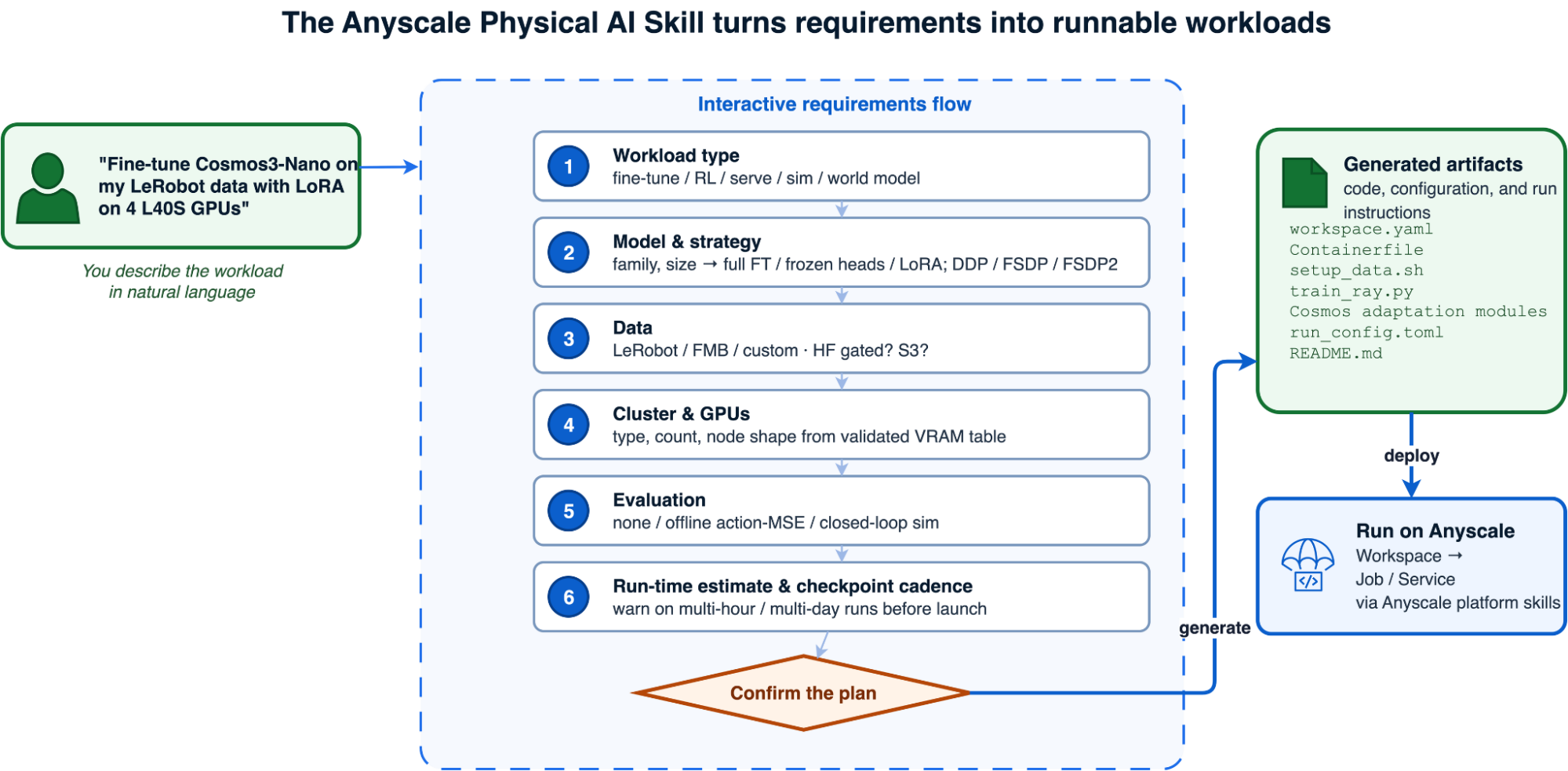 The Anyscale Physical AI Skill requirements flow
LinkWithout the skill vs with the skill
Give two coding agents the same physical AI request. Without a skill, one must guess at infrastructure and dependencies; with the skill, the other starts from validated patterns.
The difference shows up in the failures avoided:
Failure mode | Without the skill | With the skill |
Wrong GPU for the model |
| Sized from a validated VRAM table before launch |
7B full fine-tune on DDP |
| Routed to FSDP FULL_SHARD on a single 4-GPU node |
Host RAM OOM on video data |
| Disaggregated CPU-data node pool for Ray Data |
Gated checkpoint never downloaded |
| Verified with a real file download before GPU work begins |
Stale library pin |
| Exact per-model pins carried forward |
Runtime-env merge conflict |
|
|
MoE sized by active params |
|
|
Multi-day run discovered late |
|
|
LinkShow me: fine-tune Cosmos 3 from one request
NVIDIA Cosmos 3 is a strong example of why a physical AI skill needs more than generic training knowledge. Cosmos3-Nano is a 16B two-tower Mixture-of-Transformers model that combines reasoning, generation, and native action capabilities. Fine-tuning it as a robot policy means accounting for the full 16B resident model, a custom CUDA stack, distributed checkpointing, LeRobot video decode, and a training framework originally designed to launch with torchrun.
You start with the outcome you want:
Use the physical-ai skill to fine-tune Cosmos3-Nano in action-policy mode on my
LeRobot v3 dataset with LoRA, using one 4×L40S node on Anyscale.
The skill confirms the action space, camera mapping, dataset location, GPU topology, run time, checkpoint cadence, and evaluation plan before generating a self-contained directory:
The skill confirms the action space, camera mapping, dataset location, GPU topology, run time, checkpoint cadence, and evaluation plan before generating a self-contained directory:

cosmos3_nano_action_policy_20260710_120000/
├── README.md                    # architecture, hardware, run and recovery steps
├── user_request_summary.txt     # confirmed model, data, compute, and evaluation plan
├── workspace.yaml               # CPU head + one 4×L40S GPU worker
├── Containerfile                # Cosmos, PyTorch, CUDA, and flash-attn environment
├── setup_data.sh                # dataset and checkpoint staging
├── train_ray.py                 # Ray Train launcher for Cosmos
├── src/
│   ├── action_policy.py         # model and LoRA configuration
│   └── lerobot_dataset.py       # bimanual LeRobot v3 adaptation
└── run_config.toml              # batch, optimizer, parallelism, and checkpoints
The generated driver keeps the CPU head lightweight and asks Ray Train to place four workers on the L40S node. Cosmos keeps its native trainer; Ray Train replaces torchrun as the distributed launcher. The core integration looks like this, with setup helpers and file-loading code omitted:
import os
import runpy
import sys

import torch
from ray.train import FailureConfig, RunConfig, ScalingConfig
from ray.train.torch import TorchTrainer

def train_loop_per_worker(config):
    # Install the generated dataset/model configuration before importing Cosmos.
    _apply_xvla_adaptation(config["adaptation"], config["framework_dir"])

    local_rank = int(os.environ["LOCAL_RANK"])
    torch.cuda.set_device(local_rank)
    os.chdir(config["framework_dir"])

    sys.argv = ["train", f"--sft-toml={config['toml']}"]
    runpy.run_module("cosmos_framework.scripts.train", run_name="__main__")

trainer = TorchTrainer(
    train_loop_per_worker,
    train_loop_config={
        "framework_dir": FRAMEWORK_DIR,
        "toml": RUN_CONFIG,
        "adaptation": generated_files,
        "overrides": [],
    },
    scaling_config=ScalingConfig(
        num_workers=4,
        use_gpu=True,
        resources_per_worker={"GPU": 1, "CPU": 10},
    ),
    run_config=RunConfig(
        name="cosmos3-action-policy",
        failure_config=FailureConfig(max_failures=0),
    ),
)
trainer.fit()
The generated configuration uses LoRA rank 32: 30.7 million trainable parameters, or about 0.2% of the 16B model. On 48 GB L40S GPUs, the validated per-rank batch ceiling is four; effective batch size scales through gradient accumulation rather than a larger per-rank batch. The model is sharded across the four GPUs on one node, while PyAV decodes the three-camera LeRobot stream on CPU workers.
In a validated 60-iteration run on 4×L40S, windowed mean loss fell from 12.20 → 10.66 → 8.93 across thirds. Distributed checkpoints landed at iterations 30 and 60; each was roughly 86 GB because it included model, EMA, and fp32 optimizer state. The skill surfaces these workload-specific constraints before a long run begins.
For a more conventional Ray Data → Ray Train VLA pipeline, see Optimizing VLA Fine-Tuning Performance with LeRobot Datasets and Ray, where file-group partitioning reduced redundant video opens on DROID by 135×, from 286,000 to 2,124.
LinkDeep dive: closed-loop RL post-training for a driving VLA
Fine-tuning and serving are well-trodden. The hardest workload the skill supports — and the one that best shows what Ray and Anyscale buy you — is closed-loop reinforcement learning for an autonomous-driving VLA.
LinkWhy closed-loop is different
The physical AI skill supports both open-loop and closed-loop RL. Open-loop RL is the simpler starting point: it scores the policy's predicted trajectory against a trajectory recorded in the dataset, without running a simulator. Because the system only needs to train the policy and generate rollouts, its GPU memory and compute requirements are comparatively modest.
Closed-loop RL answers the harder question: what would happen if the car actually took the policy's action? It puts the policy in the loop with a simulator that reacts to each decision. This produces more realistic feedback, but it is also substantially more resource-intensive and operationally complex. Policy training, rollout inference, scene rendering, physics, and simulation must run together, increasing GPU memory and compute needs while adding coordination and failure modes. NVIDIA's AlpaSim provides this reactive driving environment, and AlpaGym connects it to GRPO training so the reward reflects what happens when the policy drives.
The skill reaches this from the same natural-language entry point:
Use the /anyscale-workload-physical-ai skill to run closed-loop GRPO post-training for Alpamayo-1.5 with AlpaSim.Closed-loop changes the memory profile. The validated AlpaGym configuration uses full-parameter policy updates, a dedicated policy-inference rollout runtime, and the simulator on one 8× A100-80GB node. The skill flags that expensive worker before launch and recommends validating the stack in an Anyscale Workspace.
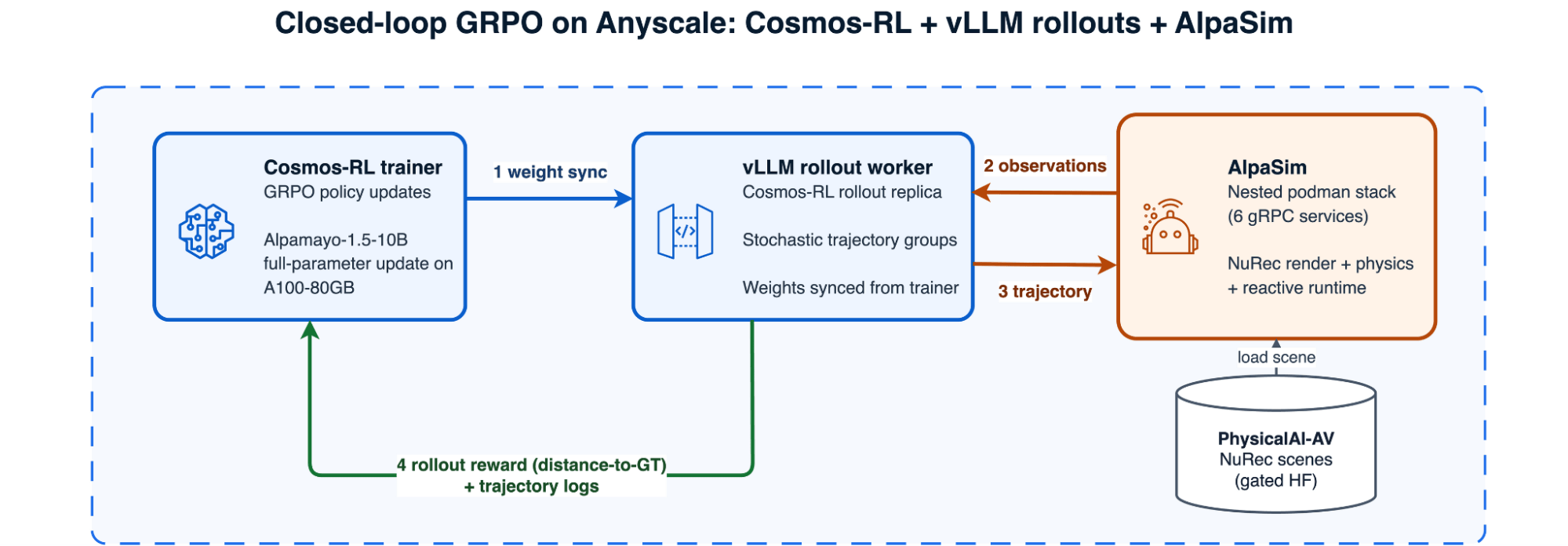 Closed-loop GRPO on Anyscale with a Cosmos-RL trainer, AlpaGym rollout runtime, and nested-Podman AlpaSim
LinkWhat Ray and Anyscale resolve
This is where the plumbing gets serious, and where the skill's baked-in fixes earn their keep:
Nested containers without a Docker daemon. AlpaSim is a six-service gRPC stack. The generated workload runs it with rootful Podman behind a Docker-compatible socket.
GPU passthrough that actually works. On this validated Podman path, Compose GPU reservations and
--gpusare ignored. The generated workload patches per-serviceNVIDIA_VISIBLE_DEVICESassignments and usesnvidia-container-runtimein legacy mode.Hardware selected from evidence. Small GPU nodes with L40S hit memory walls. The validated configuration uses 8× A100-80GB, with
PREFER_SPOTand cross-zone scaling to improve capacity access.Gated access, verified twice. Alpamayo weights and
PhysicalAI-Autonomous-Vehicles-NuRecscenes require independent Hugging Face grants. The workload verifies both with real file downloads before the A100 worker is used.
The Ray layer is intentionally small: reserve all GPUs on one worker and dispatch the validated multi-process harness to it. AlpaGym owns the training/rollout/simulator loop inside that task.
import ray

@ray.remote(num_cpus=24, max_retries=0)
def run_phase(script: str, args: list[str]) -> int:
    return subprocess.run(
        ["bash", script, *args],
        cwd="/mnt/cluster_storage/alpagym/bundle",
        check=False,
    ).returncode

# Reserve all eight GPUs on the p4de worker. Inside this task, AlpaGym starts the
# Cosmos-RL trainer, AlpaGym rollout runtime, and nested-Podman AlpaSim services.
task = run_phase.options(num_gpus=8, accelerator_type="A100-80G")
return_code = ray.get(task.remote("run_all.sh", ["trend"]))
assert return_code == 0LinkWhat the agent validation showed
The validation confirmed that the complete pipeline runs end to end on Anyscale: custom image, two access grants, nested-Podman AlpaSim, Cosmos-RL policy updates, AlpaGym rollouts, and checkpoint export.
The initial smoke configuration used a coarse progress_safety reward and a batch of one. It completed, but reward_std=0, so GRPO had no within-group learning signal. The A100 trend configuration instead used distance_to_gt, train_batch=8, stochastic sampling, and multiple generations. Across a 12-step run, reward_std stayed between 0.001 and 0.011 and loss decreased, indicating a nonzero optimization signal.
The run did not show a clear increase in reward. It covered only one to five common scenes where the base policy was already close to the logged trajectory. Evaluating policy-quality improvements will require harder, long-tail scenes, more training steps, and more rollout and trainer replicas. The included health scraper therefore checks three conditions separately: nonzero reward variance, reward trend, and loss trend. These results validate the training harness and the presence of a learning signal, but not an improvement in policy quality.
LinkClosing the loop: from one workload to a data flywheel
The pillars are more powerful together than apart. Once a policy can be fine-tuned, served, and evaluated in simulation on the same platform, those stages compose into a data flywheel: train a policy, serve it, roll it out in the simulator, keep the trajectories that succeed, union them back into the dataset, and retrain. We validated this loop with a π0.5 policy and Isaac Lab Franka rollouts—Ray Train, Ray Serve, and Ray Core simulation workers running on one cluster, with a reward-filtered dataset union and a before/after comparison built in.
The simplest way to fold trajectories back is a straight union: concatenate the original demonstrations with the simulated episodes that clear a reward threshold. That's a perfectly good starting point and what we used to validate the loop—but the sim/real mix ratio is itself a knob worth tuning, and we'd recommend graduating to a more deliberate strategy as the flywheel matures. Too little simulated data and you never reach the long-tail cases the simulator was meant to surface; too much, and the policy drifts toward what the simulator captures while forgetting real-world nuances it doesn't—widening the sim-to-real gap. Because the union is just a Ray Data operation, you can swap the naive concatenation for weighted or stratified sampling—capping the sim fraction, oversampling rare scenarios, or curriculum-mixing sim and real over training—without changing the rest of the loop.
Because every stage uses standard Ray APIs, the flywheel is not a separate orchestration system. It composes Ray Train, Ray Serve, Ray Core, and Ray Data in one Python-native workflow that you can rerun as the dataset evolves.
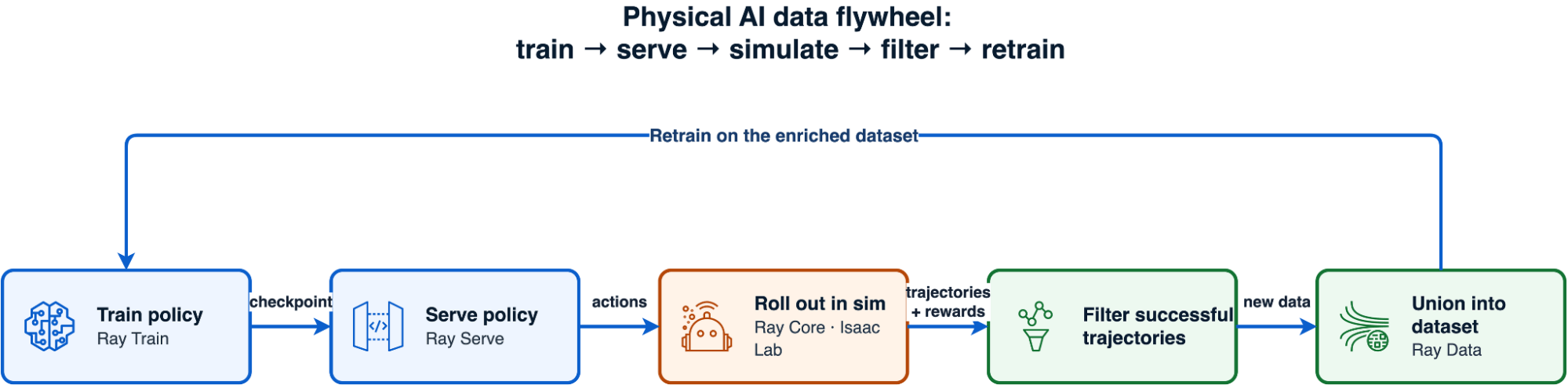 The data flywheel: train a policy, serve it, roll it out in simulation, filter successful trajectories, retrain
LinkFrom development to production on Anyscale
The Anyscale Physical AI Skill generates the workload; the Anyscale Platform Skills run and operate it. /anyscale-platform-run launches it, /anyscale-platform-inspect reads live workload state, and /anyscale-platform-fix diagnoses and repairs a failing run. The recommended path is to validate in an Anyscale Workspace first, then promote finite training and simulation workloads to an Anyscale Job or production endpoints to an Anyscale Service. The skill also routes generic workloads to /anyscale-workload-ray-train, /anyscale-workload-ray-serve, or /anyscale-workload-ray-data when robotics-specific orchestration is unnecessary.
Related Agent Skills and physical AI resources
For the broader product story and other specialized skills:
Introducing Anyscale Agent Skills explains how workload, platform, and infrastructure skills compose across the development lifecycle.
Introducing the Anyscale Agent Skill for LLM Post-Training covers the same requirements-first approach for SFT, preference optimization, and RLVR.
Stop Reading Logs: Debugging Ray on Anyscale with Agent Skills shows how the inspect and fix skills operate a workload after generation.
For more on physical AI with Ray and Anyscale:
Optimizing VLA Fine-Tuning Performance with LeRobot Datasets and Ray goes deeper on distributed video ingestion and Ray Train.
Scale Robot Policy Evaluation with Ray covers Ray Serve policy endpoints and parallel simulator workers.
How Torc Hit 90% GPU Utilization—and Other Stories on Scaling AI with Ray recaps the VLA track spanning data, training, and simulation.
See how Physical Intelligence and Bedrock Robotics build physical AI systems on Anyscale.
Explore the Anyscale robotics and physical AI solution overview.
LinkGet started
The Anyscale Physical AI Skill turns a robot-learning idea into a requirements-backed implementation using validated Ray and Anyscale patterns. It will not choose the right dataset, reward, or scientific objective for you. It will help keep dependency drift, GPU sizing, data plumbing, and simulator bring-up from blocking the experiment.
Install the skills: follow the Anyscale Agent Skills documentation.
Try it: ask your coding agent to use the
/anyscale-workload-physical-aiskill and describe the model, dataset, goal, and preferred cloud.Explore physical AI on Anyscale: review the related blogs, case studies, and solution overview above.
Run on Anyscale: Start for free or talk to an expert.
Table of contents
- Supported physical AI workloads, models, and simulation environments
- Why physical AI, and why now?
- What you get
- Why physical AI workloads are hard to operationalize
- How the Anyscale Physical AI Skill works
- Without the skill vs with the skill
- Show me: fine-tune Cosmos 3 from one request
- Deep dive: closed-loop RL post-training for a driving VLA
- Why closed-loop is different
- What Ray and Anyscale resolve
- What the agent validation showed
- Closing the loop: from one workload to a data flywheel
- From development to production on Anyscale
- Related Agent Skills and physical AI resources
- Get started