Running Ray at scale on Kubernetes with KubeRay
LinkWhat is KubeRay
Ray is an open-source framework for scaling Python and AI workloads across many machines. It handles everything from distributed training to online serving through a single Python API, so users can write code once and run it on a laptop or a thousand-node cluster.
Kubernetes, on the other hand, is where most organizations already run their infrastructure. GPUs, quotas, access control, networking, and monitoring are all managed there. Teams that adopt Ray rarely want a second cluster manager alongside Kubernetes. They want Ray to run on the Kubernetes they already have.
The challenge is that Kubernetes only understands its own native resources like Pods, Services, and Jobs. It has no concept of a Ray cluster, a Ray job, or a Ray Serve application. Running Ray directly on Kubernetes therefore means writing your own glue: Deployments for the head and workers, a Service for the head, scripts to submit jobs and wait for them, and custom logic to scale workers or recover from failures. Every team ends up rebuilding the same plumbing.
KubeRay closes this gap. It is an open-source Kubernetes operator that brings Ray into the Kubernetes ecosystem, providing Kubernetes-native lifecycle management, autoscaling, scheduling, reliability, and observability for Ray workloads. KubeRay is the standard way to run Ray on Kubernetes today, and is the foundation of the managed Ray offerings from major cloud providers.
KubeRay introduces three custom resources: RayCluster for a long-running Ray cluster, RayJob for a single job with its own ephemeral cluster, and RayService for Ray Serve applications. We describe how these resources work in the Architecture section below.
LinkBefore and after KubeRay
While generic Kubernetes may initially handle the infrastructure Ray needs to run on, it struggles to understand Ray itself including, so every platform team ends up hand-writing the same deployments, services, submission scripts, and recovery logic to fill that missing gap. KubeRay replaces that manual work with a Kubernetes-native resource for each of the following tasks.
Task | Generic Kubernetes | KubeRay |
|---|---|---|
Start a Ray cluster | Hand-write Deployments for the head and workers and a Service for the head, and keep them in sync yourself | Define a RayCluster. The operator creates and manages the head Pod, head Service, and worker Pods |
Run a batch job | Write scripts to submit the job, poll for completion, and tear down the cluster afterward | Define a RayJob. KubeRay creates a dedicated RayCluster, submits the job, and cleans it up when the job finishes |
Serve a model | Hand-roll a Deployment and Service for Ray Serve, plus your own health checks and rollout logic | Define a RayService. KubeRay keeps Serve applications available through cluster and head-node failures and supports zero-downtime upgrades |
Scale with demand | Rely on the Kubernetes Horizontal Pod Autoscaler, which has no visibility into Ray tasks, actors, or placement groups | Ray-aware autoscaling that scales worker groups based on pending tasks, actors, and placement groups |
Recover from a head-node failure | Write custom logic to detect the failure and rebuild cluster state | Global Control Service (GCS) fault tolerance recovers cluster metadata automatically while keeping Ray Serve applications running |
Monitor and operate | Build your own tooling to surface Ray-specific status | Kubernetes-native status and Events, plus kubectl ray for a familiar CLI experience |
LinkWhere KubeRay fits between Ray and Kubernetes
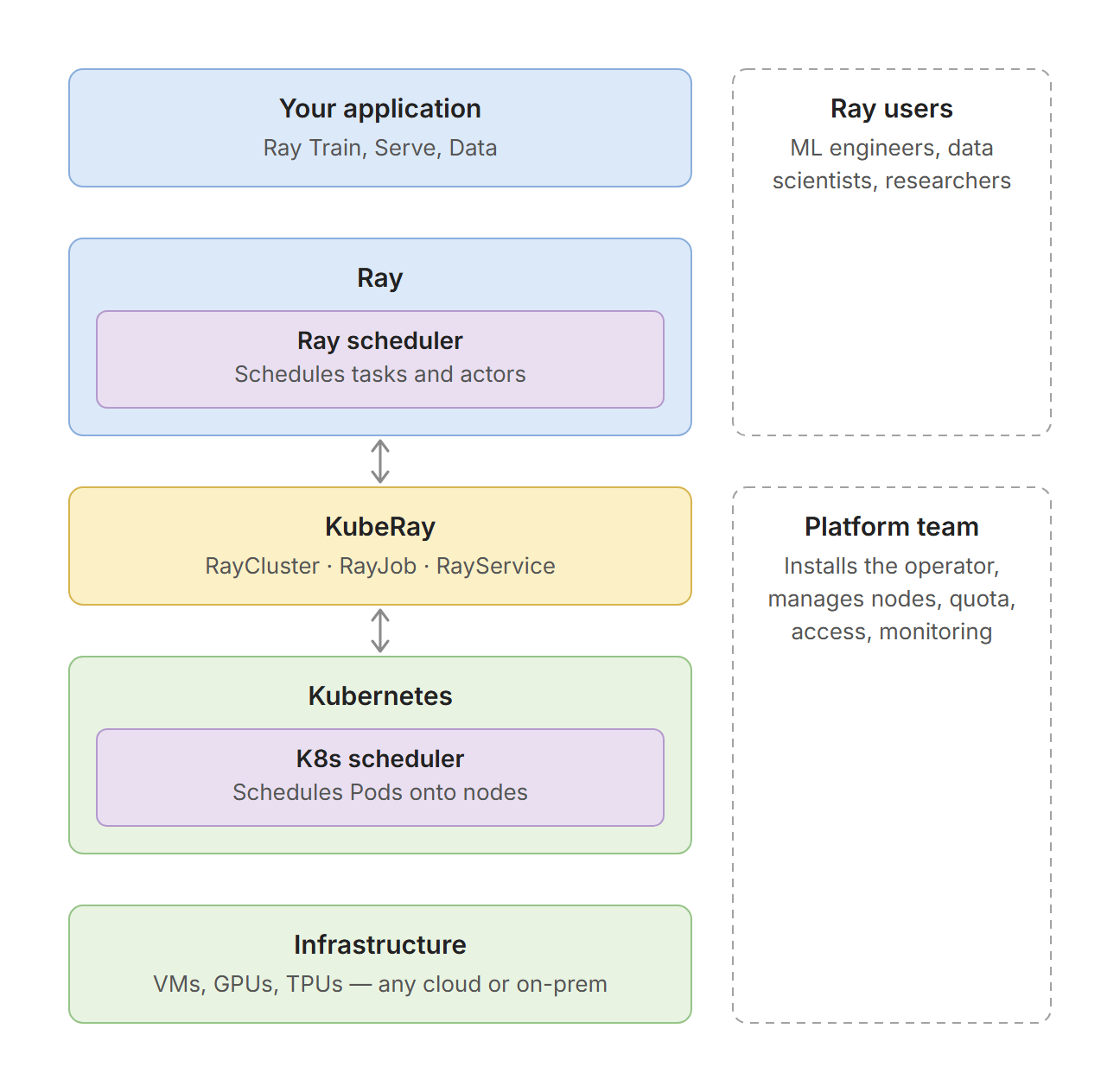
KubeRay sits between Kubernetes and Ray, and it does not replace either scheduler. Kubernetes schedules Pods onto nodes while Ray schedules tasks and actors onto the CPUs and GPUs inside those Pods. KubeRay bridges the two: it turns a RayCluster spec into Pods, and reports Ray's state back to Kubernetes as status fields and events.
This layering also splits responsibilities cleanly between two roles. Platform teams work at the Kubernetes and operator layers: they install KubeRay once, then manage node pools, quotas, access control, and monitoring with the tools they already use. Ray users, such as ML engineers and data scientists, work at the Ray and application layers: they write Ray code and execute the code on top of the custom resource (RayCluster, RayJob or RayService) KubeRay creates.
LinkWhat KubeRay provides
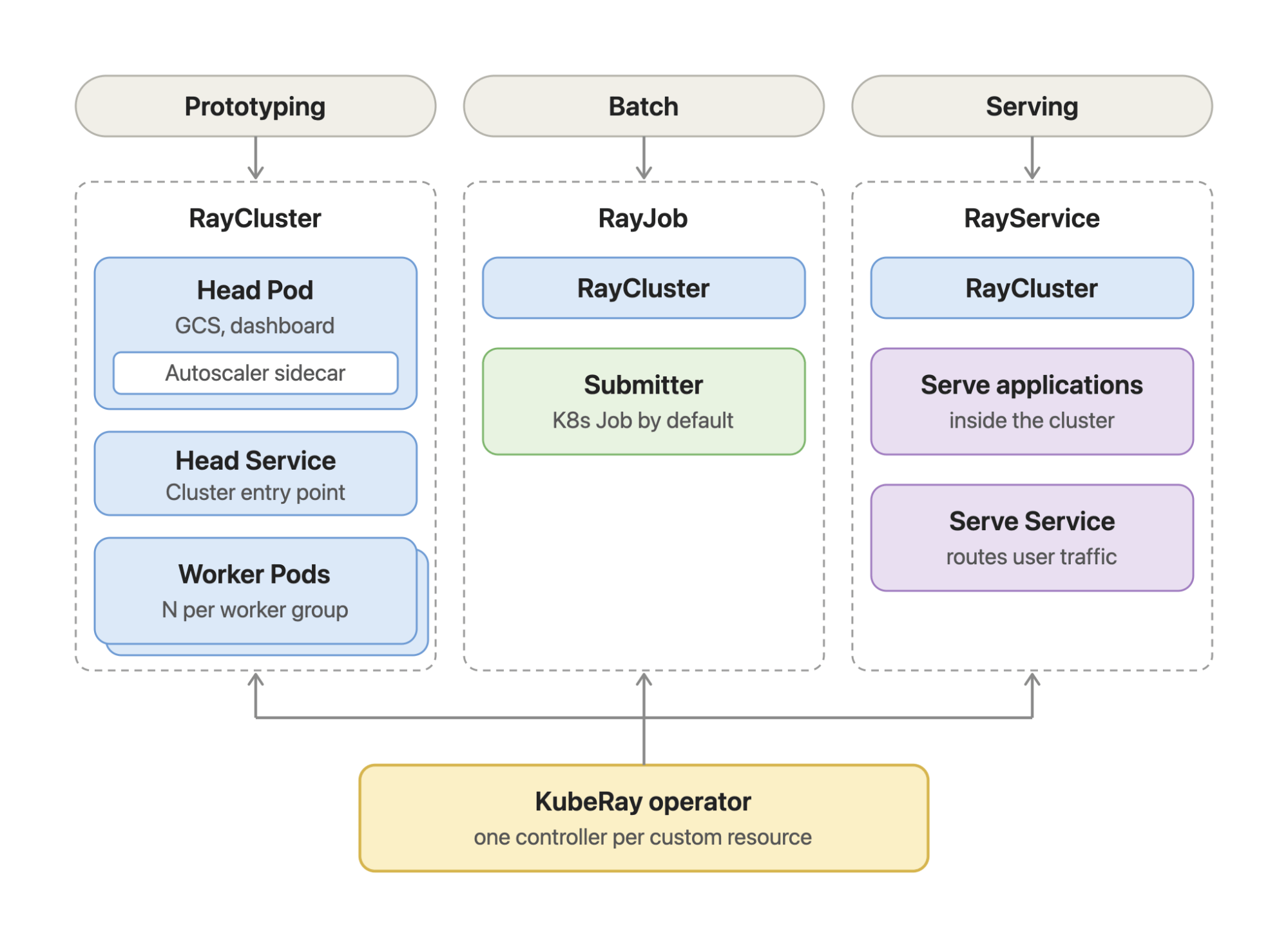
KubeRay is a Kubernetes operator with one controller per custom resource. RayCluster is the building block: the operator turns it into a head Pod, a head Service, and worker Pods. RayJob and RayService each own a RayCluster and add what their workload needs: a submitter for RayJob, and Serve applications plus a Serve Service for RayService.
LinkKey features
LinkRayCluster
Ray-aware autoscaling. Automatically scale worker groups based on workload demand, including pending tasks, actors, and placement groups.
Global Control Service (GCS) fault tolerance. Recover Ray cluster metadata after a head-node failure while keeping Ray Serve applications running.
Heterogeneous compute. Run worker groups with different CPU and accelerator configurations in the same RayCluster.
LinkRayJob
Ephemeral clusters: Create a dedicated RayCluster for each job and clean it up when the job finishes.
Multiple submission modes: Submit jobs through Kubernetes Jobs, HTTP, sidecars, or interactive mode.
Lifecycle management: Configure retries, deadlines, and cleanup policies based on job outcomes.
LinkRayService
Kubernetes-native Ray Serve: Define and manage Ray Serve applications as part of your Kubernetes workload.
High availability: Keep Ray Serve applications available through cluster and head-node failures.
Zero-downtime upgrades: Upgrade Ray applications and clusters without interrupting serving traffic, with support for blue-green and incremental upgrades.
LinkKubernetes Scheduling
Kueue and MultiKueue: Integrate Ray workloads with Kubernetes resource quotas and multi-cluster scheduling.
Gang scheduling: Support gang scheduling with Kubernetes Workload API, Volcano, YuniKorn, scheduler-plugins, and NVIDIA KAI Scheduler.
Resource and label-aware scheduling: Expose Kubernetes resources and labels to Ray for resource- and label-based scheduling.
LinkSecurity
Ray token authentication: Secure Ray clusters with token-based authentication.
Kubernetes RBAC authentication: Use existing Kubernetes RBAC policies to control access to Ray clusters.
mTLS and NetworkPolicy: Encrypt Ray Pod-to-Pod traffic and isolate Ray clusters with Kubernetes NetworkPolicies.
LinkObservability
Metrics and dashboards: Monitor Ray workloads and KubeRay with Prometheus and Grafana.
Kubernetes-native status and events: Track workload lifecycle and troubleshoot Ray resources through Kubernetes status and Events.
History Server: Preserve Ray events and logs in object storage and inspect them after a cluster has been deleted.
LinkTooling
kubectl ray: Simplify managing Ray clusters on Kubernetes with a familiar command-line experience.
KubeRay API Server: Provide simplified APIs for platforms and user interfaces to manage KubeRay resources.
LinkHow to deploy KubeRay
KubeRay works with any Kubernetes cluster. Get started by installing the KubeRay operator, then create a Ray workload using Kubernetes-native resources.
1. Install KubeRay
Follow the Getting Started with KubeRay guide to install the operator onto your Kubernetes cluster. KubeRay has been tested on managed Kubernetes services including Amazon EKS, Google Kubernetes Engine (GKE), and Azure Kubernetes Service (AKS).
2. Choose your workload
KubeRay provides these custom resources for running Ray workloads:
RayCluster: Run a Ray cluster for development and prototyping.
RayJob: Run batch workloads with a dedicated RayCluster, with automatic cluster creation and cleanup.
RayService: Deploy and manage Ray Serve applications with high availability and zero-downtime upgrades.
RayCronJob: Run RayJobs on a recurring schedule using a cron expression.
3. Deploy with Kubernetes
Deploying a Ray workload with KubeRay is as simple as applying a Kubernetes custom resource.
For example, a RayJob runs a batch training workload and manages the Ray cluster used by the job. KubeRay creates the RayCluster, waits for it to become ready, submits the training job, and can clean up the cluster when the job finishes.
Here's an example of training a PyTorch model on the Fashion MNIST dataset with CPUs on Kubernetes, showing KubeRay creating the RayCluster, running the training workload, tracking its completion, and managing the cluster lifecycle.
The training code uses Ray Train, while KubeRay uses a RayJob to run and manage it on Kubernetes.
kubectl apply -f https://raw.githubusercontent.com/ray-project/kuberay/v1.7.0/ray-operator/config/samples/pytorch-mnist/ray-job.pytorch-mnist.yamlAfter applying the RayJob, KubeRay creates the RayCluster and its Pods. Check the RayJob and verify that the RayCluster Pods are running:
kubectl get rayjob
NAME                   JOB STATUS   DEPLOYMENT STATUS   RAY CLUSTER NAME             START TIME             END TIME   AGE
rayjob-pytorch-mnist   PENDING      Running             rayjob-pytorch-mnist-9s4p2   2026-09-30T02:40:15Z              37s

kubectl get pod
NAME                                                  READY   STATUS    RESTARTS   AGE
kuberay-operator-799d594664-h5czx                     1/1     Running   0          19m
rayjob-pytorch-mnist-9s4p2-head-b6q6z                 1/1     Running   0          39s
rayjob-pytorch-mnist-9s4p2-small-group-worker-k6786   1/1     Running   0          39s
rayjob-pytorch-mnist-9s4p2-small-group-worker-thhgx   1/1     Running   0          39s
rayjob-pytorch-mnist-v4dvt                            1/1     Running   0          11s
The RayJob then submits the training workload to the newly created RayCluster. After the training finishes, the RayJob reaches SUCCEEDED:
kubectl get rayjob
NAME                   JOB STATUS   DEPLOYMENT STATUS   RAY CLUSTER NAME             START TIME             END TIME               AGE
rayjob-pytorch-mnist   SUCCEEDED    Complete            rayjob-pytorch-mnist-9s4p2   2026-09-30T02:40:15Z   2026-09-30T02:48:33Z   8m47s
You can inspect the training results from the submitter Pod:
kubectl logs rayjob-pytorch-mnist-v4dvt

2026-09-29 19:40:48,610 INFO cli.py:41 -- Job submission server address: http://rayjob-pytorch-mnist-9s4p2-head-svc.default.svc.cluster.local:8265
2026-09-29 19:40:49,584 SUCC cli.py:65 -- -------------------------------------------------------
2026-09-29 19:40:49,584 SUCC cli.py:66 -- Job 'rayjob-pytorch-mnist-5s4p4' submitted successfully
2026-09-29 19:40:49,584 SUCC cli.py:67 -- -------------------------------------------------------
...
(RayTrainWorker pid=975, ip=10.244.0.12)
Train Epoch 0:  77%|███████▋  | 1436/1875 [00:15<00:04, 91.08it/s] [repeated 92x across cluster]
(RayTrainWorker pid=975, ip=10.244.0.12)
Train Epoch 0:  92%|█████████▏| 1719/1875 [00:18<00:01, 88.59it/s]
...
(RayTrainWorker pid=975, ip=10.244.0.12) Reporting training result 10: TrainingReport(checkpoint=None, metrics={'loss': 0.3702628721599095, 'accuracy': 0.8646}, validation_spec=None)
2026-09-29 19:48:30,801 SUCC cli.py:65 -- ------------------------------------------
2026-09-29 19:48:30,801 SUCC cli.py:66 -- Job 'rayjob-pytorch-mnist-5s4p4' succeeded
2026-09-29 19:48:30,801 SUCC cli.py:67 -- ------------------------------------------
For more ready-to-use examples, see the KubeRay sample configurations for RayCluster, RayJob, RayService, and RayCronJob. Enjoy running Ray on Kubernetes with KubeRay!
LinkJoin the Ray community
KubeRay is built in the open. Connect with the community, share feedback, and contribute:
Ask questions in the #kuberay channel on the Ray Slack workspace.
Meet the community at the bi-weekly KubeRay community meeting. You can find the schedule on the Ray/KubeRay LFX calendar.
Help shape the roadmap by sharing your feature requests and feedback on kuberay#2999.